
Quick answer: GainFrame Coach is an AI body composition analyst built into the app that already knows your latest check-in, GainFrame Score, 30 days of trends, recent workouts, sleep, height, age, and stated goal — so you can ask "why did my body fat go up this week?" and get an answer grounded in your actual data, not generic fitness advice.
You open ChatGPT and type "why did my body fat go up this week?". It gives you the same five reasons it would give anyone — water retention, sodium, muscle gain, measurement variance, training stress — none of which it can verify against your data. You scroll, you nod, you close the tab no smarter than you opened it.
That is not an AI problem. It is a context problem.
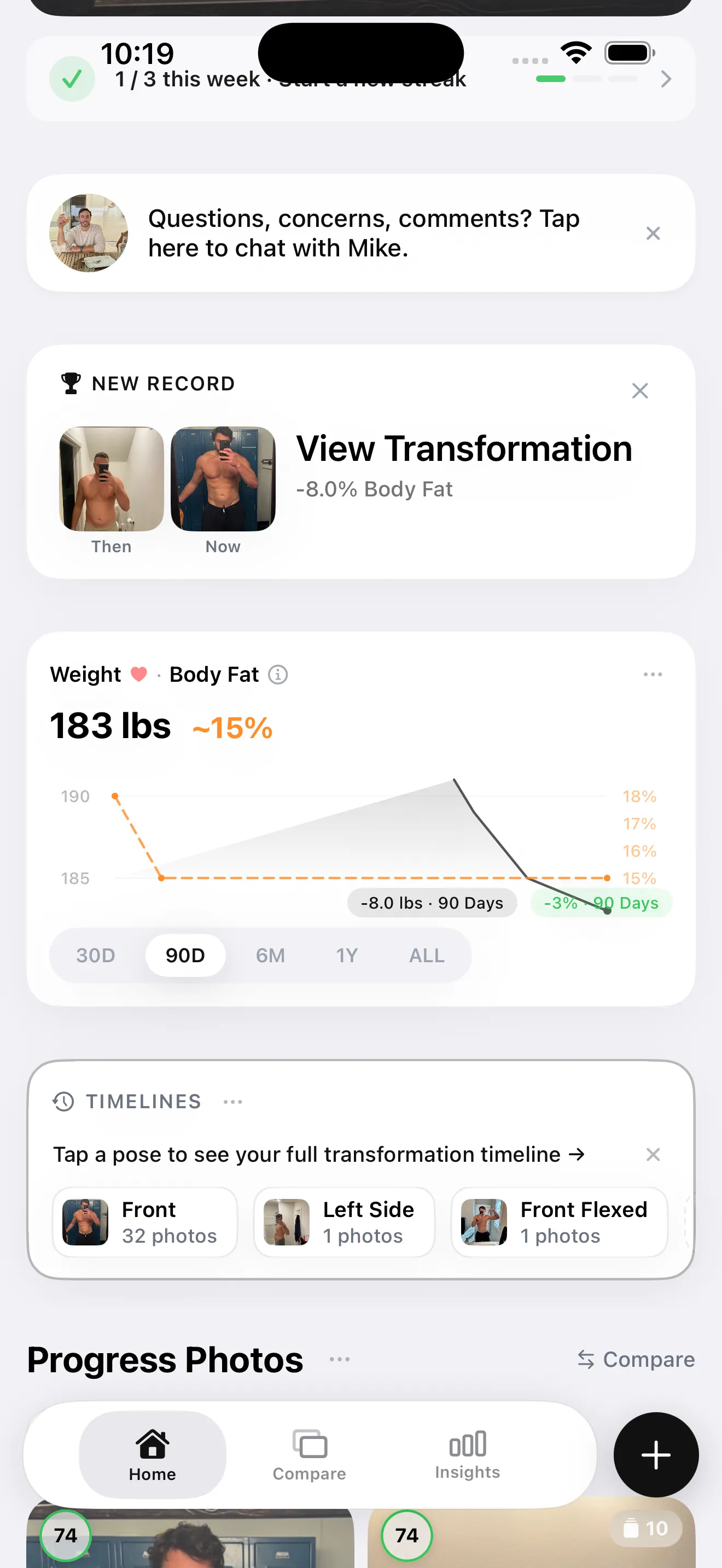
Coach is the fix. Open it inside GainFrame and the first message lands with your file already open: this week's body fat number, your GainFrame Score components, the workouts you logged through HealthKit, your sleep last night, and the goal you set when you signed up. No setup. No "what's your routine?" warm-up question. Just answers.
What does Coach already know about you?
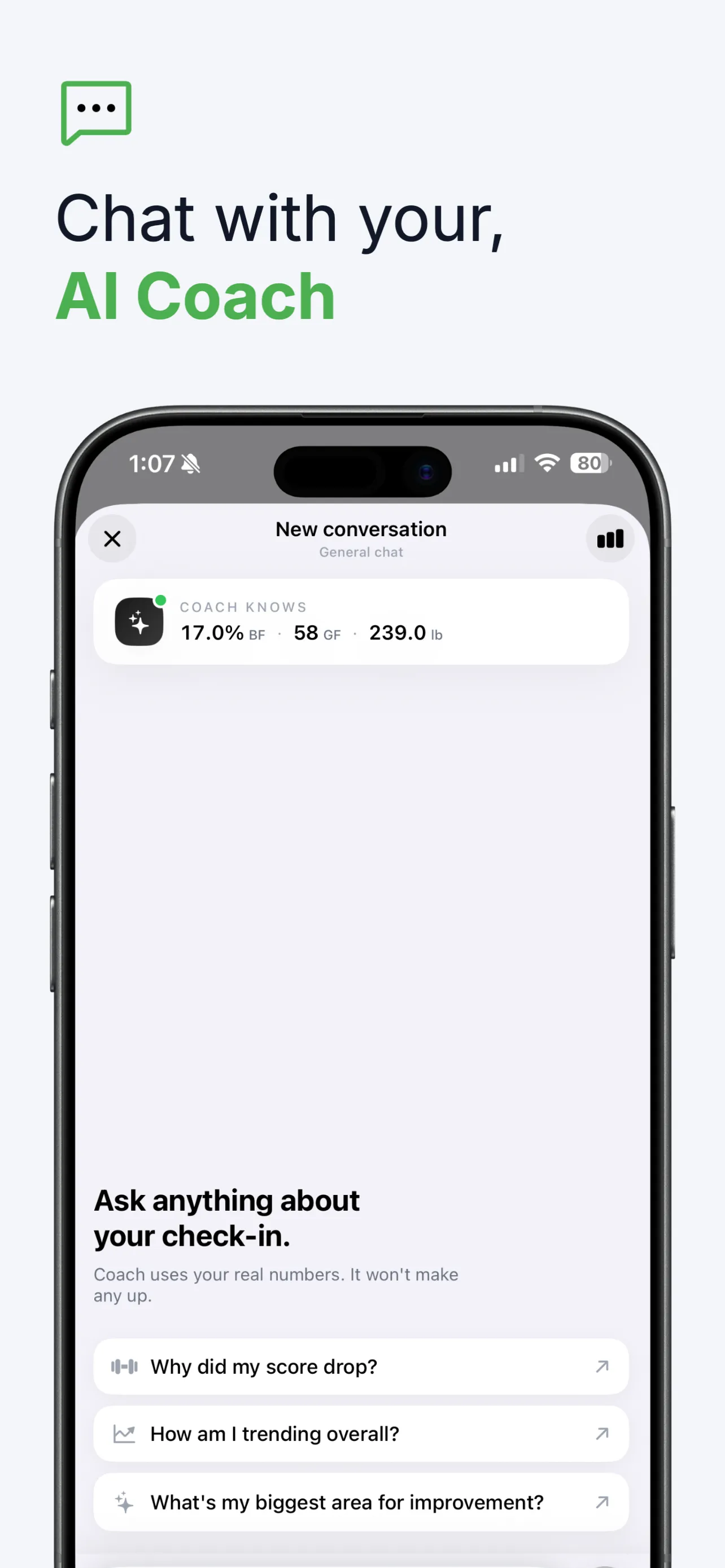
Every time you open Coach, it is preloaded with the context a human coach would need a 20-minute intake call to get. Specifically:
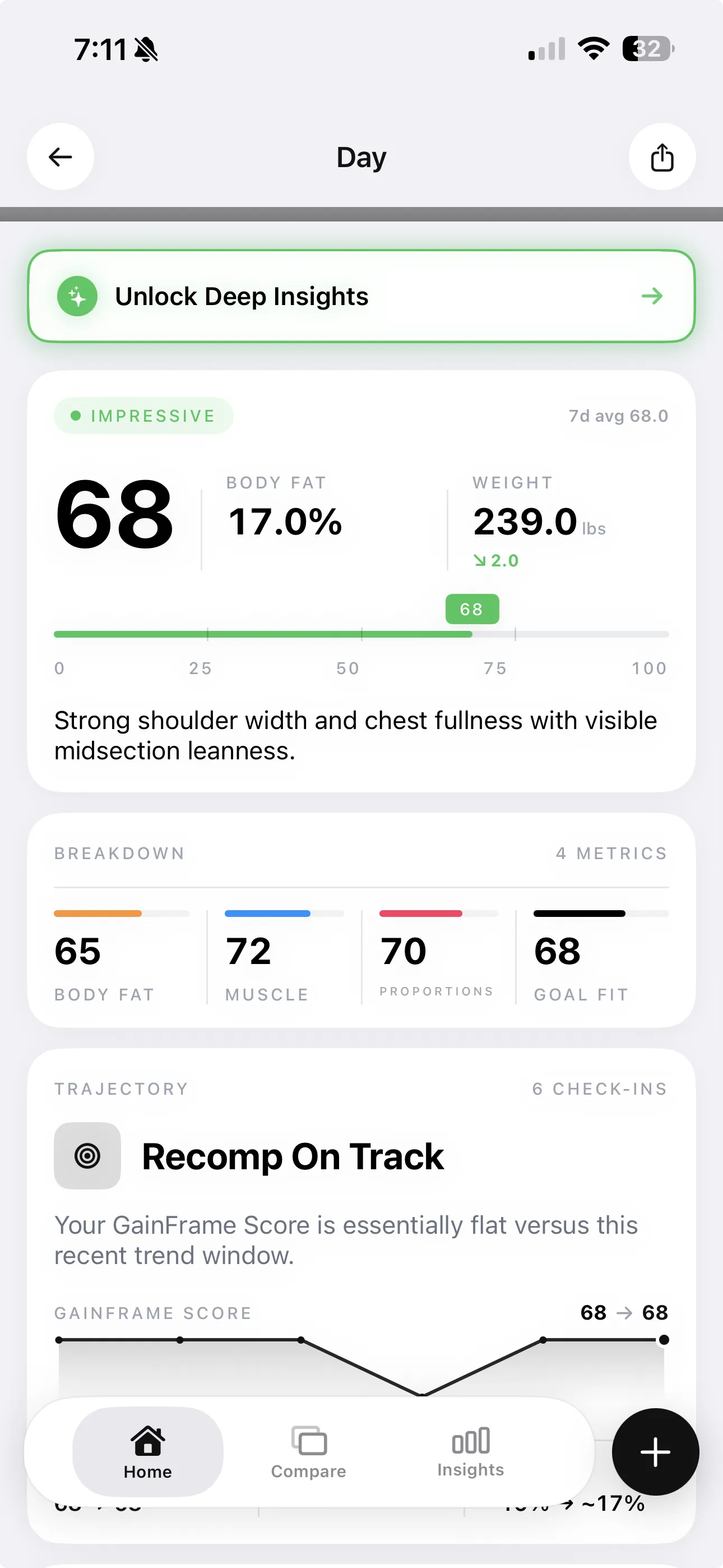
- Your latest check-in: body fat percentage, GainFrame Score, and the four score components — Body Fat, Muscle, Proportions, and Goal Fit
- 30 days of check-in history and trend direction across your weight, body fat, and score
- Your stated fitness goal — so it knows whether weight going up is progress (recomp, bulk) or a setback (cut)
- Workout history from the last 14 days, pulled from HealthKit
- Sleep duration, daily steps, active calories, and resting heart rate — so it can connect recovery to physique changes, not just training
- Your height and age, used to ground "healthy range" interpretations in something specific to you instead of population averages
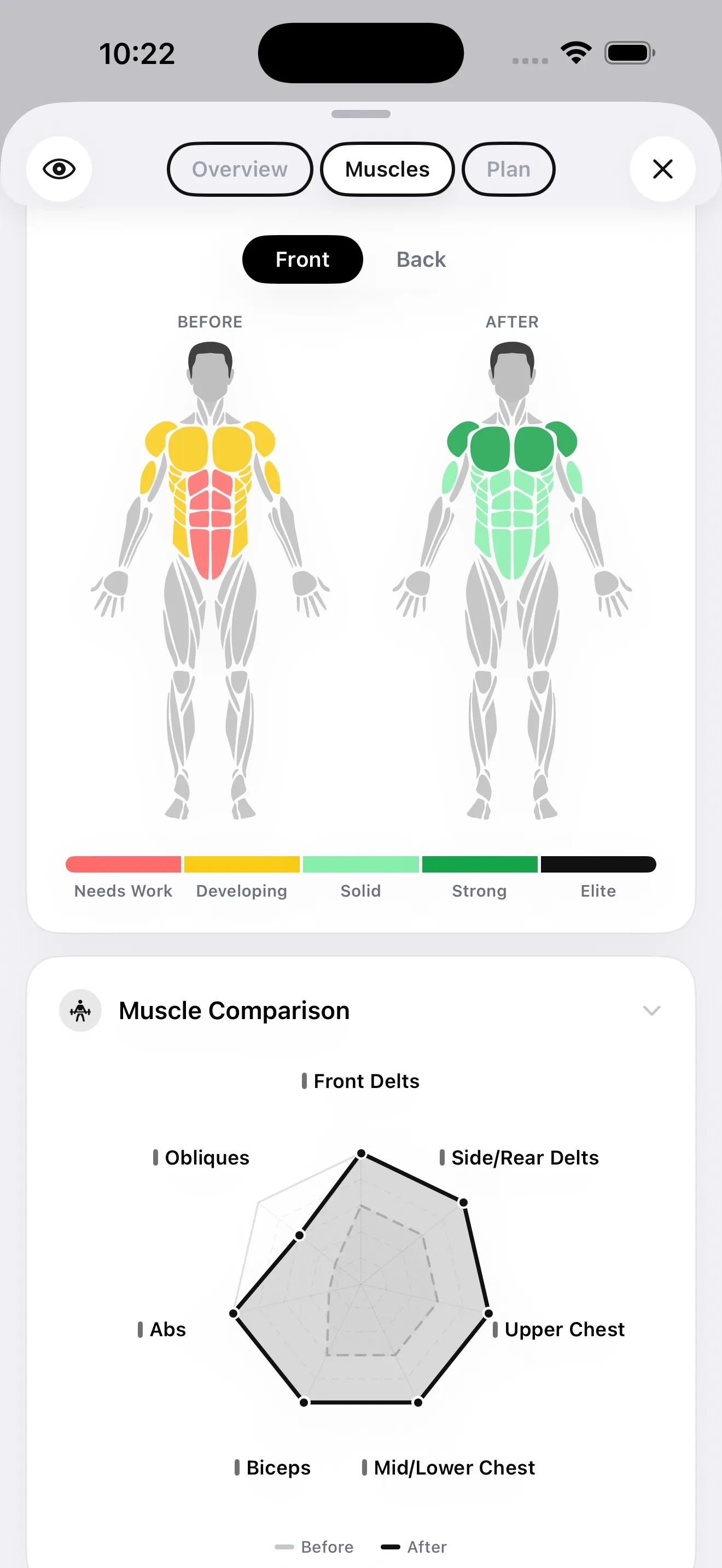
- Your deep-dive muscle assessment results, when you have run one — all 12 muscle group scores
- Stable facts you have told it before — Coach extracts goals, dietary constraints, and injury notes from past conversations and keeps them on-device so you do not repeat yourself
That last point is the one most generic AI chats cannot replicate at all. ChatGPT does not remember last Tuesday's check-in unless you paste it back in. Coach does — because the data lives in the same app.
What can you actually ask Coach?
The questions that work best are the ones a real analyst could only answer with your file open. A few examples that come up constantly:
- "Why did my body fat go up this week?" — Coach checks your workouts, scale weight, sleep, and consistency before answering. If you missed two leg days and slept under 6 hours, it will say so. If the data is genuinely ambiguous, it will say that too.
- "What does my GainFrame Score actually mean?" — Breaks down all four components by name and tells you which one is dragging the overall number down right now.
- "Compare this check-in to last month." — Leads with the deltas (body fat, weight, score, FFMI), then interprets them through your goal. The same +3 lbs reads differently for "lose fat" than for "build muscle."
- "Am I on track?" — Answers relative to your goal, not to a textbook. If your goal is recomp and the scale is flat but body fat is dropping, that is a yes.
- "How long until I hit 12% body fat?" — Extrapolates from your recent rate of change. The answer always comes with honest caveats: your trend is not a guarantee, plateaus happen, and re-feeds shift the line.
- "How are my lats progressing?" — If you have Target Training active, Coach pulls your baseline score for that group and shows the movement to current.
Notice what is missing from that list: workout programming. Coach is an analyst for your data, not a programmer for your training. It will tell you that your upper chest is lagging your front delts by eight points. It will not write your next eight weeks of push days. That is a deliberate boundary, and it is the right one — programming requires knowing how you actually lift, not just how your physique looks.
What are the three coaching personalities?
You can pick how Coach talks to you. The persona setting changes tone, length, and how directly it delivers bad news — not what it knows or what it can do.
Leads with encouragement before diving into numbers. Celebrates progress, frames setbacks constructively, closes on an actionable next step. Best for motivation and accountability when you actually want to feel good about opening the app.
Straight to the numbers. Exact deltas, component scores by name, no pleasantries. When the data is ambiguous it says so and explains why rather than guessing. Best for people who want precision over warmth.
One or two sentences. Maximum. Says the fact, says the implication, done. If the trend is unfavorable, it tells you plainly. Best for quick gut-checks when you do not want to read a paragraph to find out you missed a leg day.
You can switch persona any time from Coach settings, and you can set response length (Brief, Balanced, or Detailed) independently of the persona. Pairing Direct + Brief gets you a single-sentence verdict; Supportive + Detailed gets you a full breakdown that ends with a pep talk. Mix to taste.
How is this different from asking ChatGPT a fitness question?
The shortest answer: ChatGPT does not know your body fat percentage. Coach does. That distinction sounds small but it changes what kind of question is worth asking in the first place.
| Capability | GainFrame Coach | ChatGPT / generic AI chat | Stand-alone "AI trainer" apps |
|---|---|---|---|
| Knows your current body fat % and score | Sometimes | ||
| Reads your last 14 days of workouts (HealthKit) | Rarely | ||
| Connects sleep and resting HR to physique changes | |||
| Remembers facts across conversations | On-device | Cloud, opt-in | Cloud, account required |
| Interprets answers through your goal | Only if you paste it | Sometimes | |
| Writes you a workout program | Yes (generic) |
The honest read: Coach is not trying to be your full coaching stack. If you want a programmed routine, use Hevy or a real coach. If you want a chatbot that will write you a generic 5-day split with zero context, ChatGPT is free. Coach fills the slot in between — interpreting the data you already have, which neither of those tools does well.
Where does my data go when I chat with Coach?
The honest version, because the answer matters more than the marketing line.
When you send a message to Coach, the message and the relevant slice of your context (recent check-ins, score, HealthKit summary) are sent to Google's Gemini API for inference — the same AI engine GainFrame already uses to score your photos. The response is generated server-side and sent back. After that, the conversation is stored on-device in your phone's local database. There is no cloud account, no cross-device sync, and your messages are not used to train models.
If you have used a body composition Deep Dive in GainFrame before, this is the same data path. If you have not, the short version is: photos and chat content leave the device temporarily for inference, and never persist on any server. We surface that explicitly in the in-app privacy disclosure rather than burying it.
This matters for one practical reason: if you would not paste a piece of personal medical history into ChatGPT, do not paste it into Coach either. Treat every AI chat — ours included — as a place where what you write travels to a third-party model. The on-device storage is yours; the inference call is not.
Frequently asked questions
Is GainFrame Coach included in the free tier?
No. Coach is a Pro feature, available on the $5.99/month or $39.99/year subscription. The free tier hard-caps at 25 photos lifetime regardless of Coach usage, and Coach is not exposed at all on free. Free users can preview Coach by upgrading; there is no free message allowance.
Does Coach replace a real coach or trainer?
No. Coach is an AI analyst for the data GainFrame already has on you — your check-ins, score components, trends, and HealthKit metrics. It is not a substitute for a real coach who has watched you lift, programmed for your specific weak points, or knows your injury history. Use it alongside professional coaching, not instead of it.
Where does my conversation data go when I chat with Coach?
Coach messages are sent to Google's Gemini API for inference, the same way GainFrame analyzes your photos. After processing, conversations are stored on-device only. There is no cloud account, no syncable conversation history across devices, and your messages are not used to train models.
Can I switch coaching personalities mid-conversation?
Yes. The persona toggle (Supportive, Analytical, or Direct) is a global setting in Coach — switch it at any time and the next response uses the new style. You can also independently set response length to Brief, Balanced, or Detailed without changing the persona.
What does it mean that Coach remembers facts across conversations?
Coach extracts a small set of stable facts from past chats — your stated goal, dietary constraints you've mentioned, recent injuries — and keeps them on-device so it does not ask you the same question on every visit. You can review and clear this memory from Coach settings at any time.
Can Coach answer questions about specific muscle groups or Target Training?
Yes, but only if you have completed a deep-dive muscle assessment. When that data exists, Coach has access to your 12 muscle group scores plus Target Training baseline-to-current movement. Ask about specific groups by name ("how are my lats progressing?") and it will quote the actual numbers rather than guess.
Three questions to ask Coach today
If you have Pro and have not opened Coach yet, the fastest way to find out whether it earns its keep is to run these three queries in order:
-
"What's my body fat trend over the last 30 days?" — establishes a baseline read. You should already roughly know the answer, so this is a sanity check on whether Coach's interpretation matches yours.
-
"What is currently driving my GainFrame Score?" — surfaces which component (Body Fat, Muscle, Proportions, or Goal Fit) is the bottleneck right now. This is the single most useful thing to know before your next training block.
-
"Am I on track for my stated goal, or do I need to change something?" — forces Coach to interpret everything through your specific goal rather than against generic recomp benchmarks. The answer is what to act on.
If those three answers feel sharper than what you would have gotten by typing the same questions into ChatGPT, Coach is doing its job.
Coach does not replace your coach, your program, or your judgment. It replaces the part of an AI fitness chat that has to ask you twenty questions before it can say anything useful — because GainFrame already knows the answers.
Try Coach with your own data
GainFrame is iOS-only. Free tier covers your first 25 photos. Coach is included on Pro at $5.99/mo or $39.99/yr — same Pro tier that unlocks AI Deep Dive, Future Physique, and unlimited photos.
Download GainFrame Free