
Quick answer: RIRLift is worth trying if you want to log your lifting session from Apple Watch and think in reps in reserve. Hevy is the stronger fit for training with friends or across Apple and Android devices. Both support phone-free watch workouts. Choose based on the logging flow you will actually use between sets.
You finish 10 reps, rack the weight, and reach for your phone. Log the set. Check the timer. Notice a notification. Your two-minute rest now has a conversation in it.
The part I like most about RIRLift is how seamless tracking from your watch feels. That is the reason to consider it alongside Hevy: how easily you can record the set and get back to training.
This comparison checks the published features, support documentation, and US pricing available on September 7, 2026. The watch preference is my take; the feature comparison is based on those sources. There is no timed head-to-head benchmark behind the recommendation.
Why consider RIRLift if you already use Hevy?
RIRLift puts load, reps, and reps in reserve together on the wrist. Its appeal is especially clear when your program already tells you how much effort to leave in each set. A target such as eight reps with two left in the tank fits naturally into that screen.
Hevy already handles the basics well. If your routine, history, and training partners are there, switching needs to solve a specific annoyance. For me, the worthwhile question is whether the watch makes logging feel easy enough that I keep doing it throughout the session.
Keep Hevy if you already have that habit. Try RIRLift if reaching for your phone is the part you want to change. Our broader workout tracker roundup covers the other logging styles.
What does RIRLift let you do from Apple Watch?
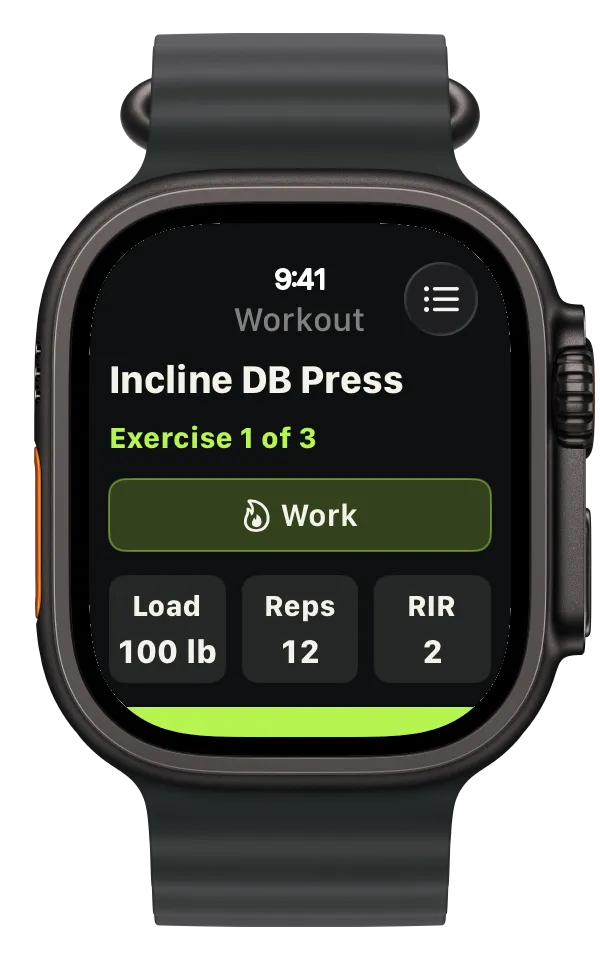
RIRLift's public product image: load, reps, and RIR on the workout screen. Source: RIRLift.
RIRLift's published watch workflow covers starting the session, changing set values with the Digital Crown, running an automatic rest timer, and replacing an exercise when equipment is taken. Previous values are prefilled, which gives you a starting point for the next entry.
Picture a crowded push day. You planned a machine press, someone is using it, and you choose dumbbells instead. Being able to make that change where you are already logging is a useful detail. The same applies when the second set drops from 10 reps to eight: correcting the result should feel routine.
Afterward, check that the workout reached your phone. RIRLift's support instructions recommend opening the iPhone app nearby after a watch session if syncing needs help. That is a good first-session check before you move a whole training block over.
Can Hevy also work without your phone?
Yes. Hevy supports offline workouts from Apple Watch and Wear OS. Hevy's own watch feature description explicitly covers syncing routines and leaving your phone in the locker room.
That matters to this comparison. Owning a watch is already a reason to try the watch app in your existing tracker. A change of hardware interaction might solve your problem before you need a change of app.
Hevy also offers RPE tracking. Enable it under workout settings to record effort alongside your sets. The meaningful difference is how each app presents effort and fits your routine, rather than whether Hevy can record it at all.
How do RIRLift and Hevy compare side by side?
| What matters | RIRLift | Hevy |
|---|---|---|
| Best fit | Wrist logging with RIR targets | Shared routines and broad device support |
| Phone and watch | iPhone and Apple Watch | iOS, Android, Apple Watch, Wear OS |
| Phone-free watch workout | Supported | Supported |
| Effort logging | Reps in reserve | RPE, enabled in settings |
| Planned effort | RIR targets in routines | Standard routine editor documents RPE entry during live workouts |
| Weekly muscle volume | Hard sets per muscle | Set-count charts per muscle |
| Training with friends | Optional private sharing | Feed, follows, comments, shared routines |
| Free routine limit | Website lists 4 active routines; see caveat below | 4 saved routines |
| Long-term analytics | Pro adds all-time views | Pro extends graphs beyond 3 months |
| Moving your log | Imports Hevy exports; CSV export is Pro | Workout CSV export |
Sources: RIRLift's feature and Pro overview, Hevy's feature guide, routine limits, effort programming, and muscle-volume charts.
Is RIR logging a reason to switch from Hevy?
RIR means how many additional clean reps you think you could have completed. RPE expresses effort on a numerical scale. In the lifting convention both apps describe, two reps in reserve is approximately RPE 8. Both depend on your judgment. RIRLift's RIR guide and Hevy's explanation cover the distinction.
The planning detail is more useful than the terminology. RIRLift lets you prescribe an effort target in a routine, then record the actual result. Hevy's standard routine documentation says its RPE field is entered during a live workout. You can still keep effort guidance in your notes.
If your coach writes every set with a target RIR, having that target built into the log may save a little translation. If you already record RPE consistently, changing the label alone is a weak reason to move your history.
Where is Hevy the better choice?
Hevy makes sense when your training has a social component. Following a friend, seeing their session, and saving a routine are part of its documented feature set. That is useful if the people who keep you consistent use different phones.
The analytics are also substantial. Hevy includes exercise performance, personal records, and muscle-group set counts. Its free performance graphs cover three months; Pro extends those views. That graph limit does not delete older workouts: saved sessions remain accessible.
Hevy can help with programming, too. Hevy Trainer is a Pro feature that generates a plan and adjusts working weights from performance. RIRLift also offers program-building options, so describing either app as exclusively a blank logbook would miss current features.
If you are also considering a simpler phone log, read Hevy vs Strong.
What do RIRLift and Hevy cost?
| US paid option | RIRLift | Hevy |
|---|---|---|
| Monthly | $2.99 | $2.99 |
| Yearly | $23.99 | $23.99 |
| Lifetime | $69.99 | $74.99 |
Prices checked September 7, 2026, against RIRLift's US App Store listing and Hevy's published Pro prices. Regional prices and offers can differ.
RIRLift's free-tier descriptions disagree. The website lists unlimited phone and watch workout logging with four active routines. The App Store description still lists full Apple Watch logging among Pro unlocks. Confirm what your installed version includes before choosing it specifically for free watch use.
With the same listed monthly and annual prices, the subscription comparison comes down to the features you use. Try your normal session first. A small lifetime-price difference is less important than which app you want to open three or four times a week.
Who should choose each app?
Choose RIRLift if you want your watch to handle the session
Start here if you already think in RIR and want the set-entry screen close at hand. Its focused workflow is the draw. You can judge that fit during one normal workout without changing your split or buying a lifetime plan.
Choose Hevy if your log is part of your training community
Stay with Hevy if its shared routines, friends, device options, and historical charts are already useful to you. Give its watch app a proper session before assuming you need to switch. Familiarity has value when you are trying to finish a workout.
What should you check during your first workout?
Use your existing program so the comparison stays about the app:
- Load the routine on your watch before you start.
- Correct a weight and a rep count, then enter your effort rating.
- Adjust a rest timer and replace one exercise.
- Finish the session and check the phone log for missing or duplicate sets.
- Look up that session as if you were about to repeat it next week.
Those checks reveal the friction that a feature list misses. Use the app that makes the complete loop easiest on your own watch.
What else should you know before switching?
Do you need an Apple Watch to use RIRLift?
No. RIRLift's website describes a complete iPhone logging workflow as well. The watch is useful when you want your phone out of the session. If you mainly train from your phone, compare routine editing and history review closely before assuming the watch-focused recommendation applies to you.
Can you move your Hevy history into RIRLift?
RIRLift advertises free imports of workout exports from Hevy, Strong, and FitNotes. Keep the original export, then compare a few imported sessions against the source. Check exercise names, units, dates, and set counts before relying on the imported history for your next workout. Import support does not guarantee every field maps identically.
Does RIRLift automatically count every rep?
RIRLift's release history describes optional beta rep counting on Apple Watch. That is separate from the manual logging workflow this comparison recommends. Check the recorded reps yourself, especially with unfamiliar movements. The appeal here is being able to record and correct a set conveniently from your wrist.
Does Hevy track effort as well as sets and reps?
Yes. Hevy has an optional RPE field that you enable in workout settings. It records how hard a set felt, using the same general effort concept behind reps in reserve. If effort tracking is your only reason for switching, try enabling that feature in Hevy first.
Is RIRLift's five-star rating enough to choose it?
The US listing showed five ratings when checked, which is a small sample. Positive early feedback is encouraging, but it cannot establish long-term reliability across devices. Use your own first-session checks, especially saving and syncing, to decide whether the app is ready for your regular training log.
Can you use either tracker alongside GainFrame?
Yes. You can keep a separate progress-photo habit with either workout log. We offer a documented Hevy integration that attaches workout context to photo check-ins; this article does not establish a direct RIRLift integration. Our Hevy integration guide explains that connection, and our about page explains who builds GainFrame.
Which should you try next?
First, choose one ordinary session from your current program. Second, run it through the watch workflow you are considering. Third, review the saved log before committing to a switch. My reason for trying RIRLift is straightforward: seamless wrist tracking makes it easier to stay focused on the lift.
Which sources were checked?
- RIRLift features and free/Pro overview
- RIRLift App Store pricing, reviews, and release history
- RIRLift watch workflow, RIR guide, and sync support
- Hevy watch and platform overview and feature guide
- Hevy RPE instructions and routine programming
- Hevy routine limits and history, exercise graphs, and weekly muscle volume
- Hevy Trainer and Pro pricing