
Quick answer: Hevy is our default workout tracker for shared routines and broad device support. RIRLift is our pick for Apple Watch logging with reps in reserve. Strong suits minimalists, GymNote Plus turns notes into data, Ladder offers coached programs, Fitbod generates workouts, and JustGains focuses on free routine sharing. Choose by how you train.
You rack the bar after your first bench set and try to remember what you hit last week. Was it 185 for 8, or 185 for 6? You scroll through three weeks of notes, give up, and guess.
That guess is the whole reason workout trackers exist. Progressive overload only works if you know exactly what you did last time. A tracker's one job is to put that number in front of you before the set, then prove over months that the numbers are climbing.
The seven apps below all do that job. They just disagree, sharply, about how you should enter the data. That disagreement is what this ranking is actually about.
If you want another app that suggests the next session, our Gravl app review and three-session trial checklist explains what to evaluate using your own equipment and training log.
What should a workout tracker app actually do?
Strip away the marketing and a workout tracker has four jobs. It should log a set in under five seconds, because your rest timer is running. It should show you last session's numbers for today's lifts before you start. It should chart progression, estimated 1RM, volume per muscle group, PRs, over months. And it should let you export your own data.
Use those four jobs as your checklist. The apps below differ in how they log sets, provide programs, and handle exports. The ranking reflects those trade-offs.
1. Hevy, Best workout tracker for most lifters
Platform: iOS App Store, Android, web, Apple Watch, Wear OS · Price: Free core, optional Pro
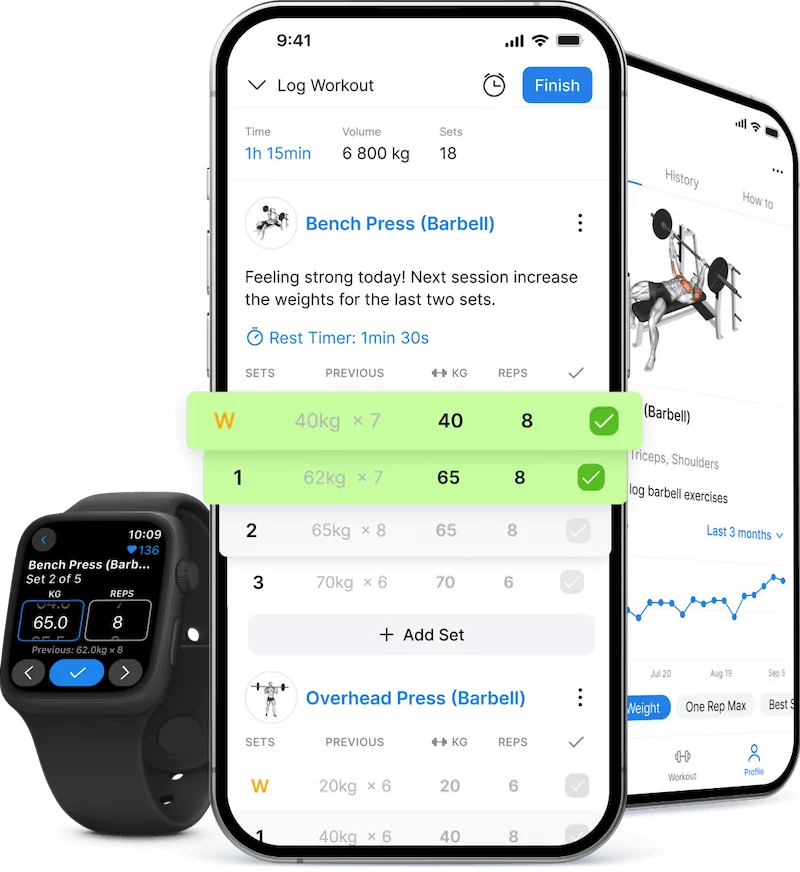
Hevy's logging flow: sets check off green, volume totals live, rest timer built in.
Hevy earns the top slot through a useful combination of structured logging, shared routines, and broad device support. Its free tier includes unlimited workout logging and four saved routines. Free performance graphs cover three months, while older saved workouts remain accessible.
For a closer look at exercise instructions, routine libraries, and saved workout limits, compare Jefit and Hevy.
Two things separate it from Strong. The social feed, follow training partners, see their sessions, give props, turns out to be a genuine retention feature if accountability-by-visibility works on you. And development pace: Hevy ships features fast, including a public API that other apps can build on.
The honest knock is that structured logging has a rhythm some lifters never take to. Every exercise is a dropdown, every set is a row. If that friction bothers you, GymNote Plus further down this list was built for you.
Hevy also supports offline Apple Watch and Wear OS workouts, and Hevy Trainer now supplies adaptive plans with Pro. Read Hevy vs Strong for the logging comparison or RIRLift vs Hevy for the watch workflow.
2. RIRLift, Best for Apple Watch logging with RIR
Platform: iOS App Store, Apple Watch · Price: Free tier; Pro listed at $2.99/month, $23.99/year, or $69.99 lifetime (US, checked September 7, 2026)
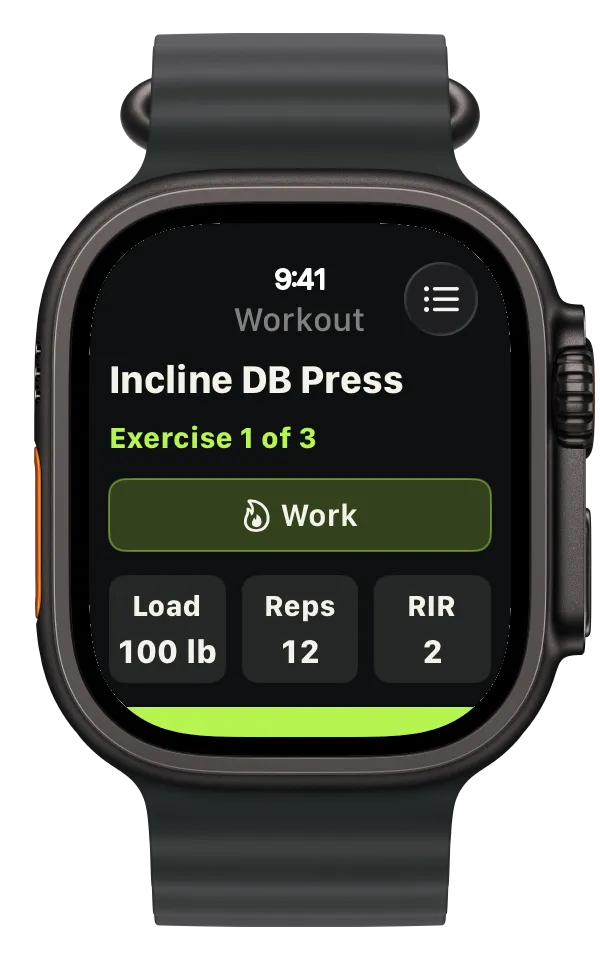
RIRLift keeps the set's weight, reps, and effort together on your wrist. Product image: RIRLift.
The reason I like RIRLift is simple: it makes tracking from your watch feel seamless. If pulling out your phone interrupts your session, this is the app I would try next.
Its documented workflow puts set entry, rest timers, and exercise swaps on Apple Watch. You can plan an RIR target, then log how many reps you actually had left. That is a natural fit when your program already prescribes effort alongside weight and reps.
Hevy also supports phone-free watch workouts. RIRLift earns this slot for its focus on the wrist workflow and RIR, while Hevy remains the broader choice for mixed-device training groups.
Check the free limits in your installed version: RIRLift's website includes watch logging, but its App Store description lists full watch logging under Pro. Our RIRLift vs Hevy comparison covers the pricing caveat and what to check during a first session.
3. Strong, Best minimal workout log
Platform: iOS App Store, Android, Apple Watch · Price: Free tier, subscription for full features
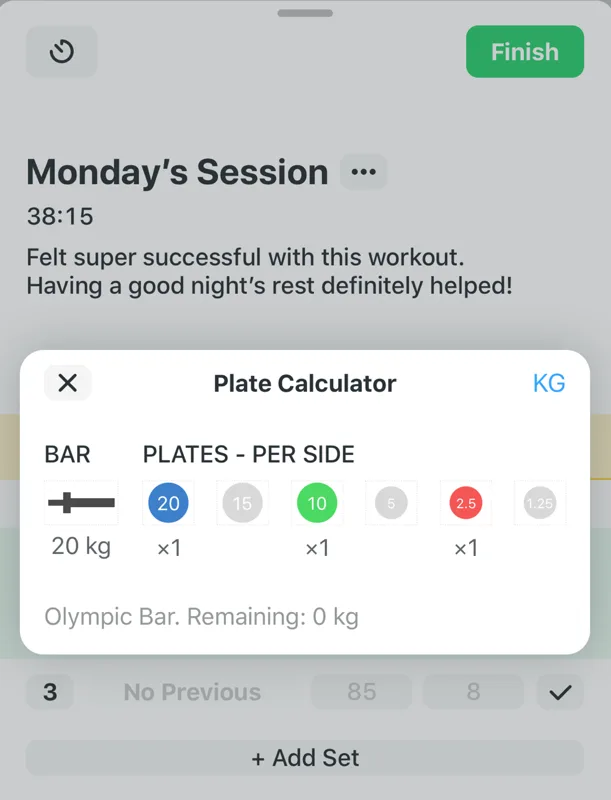
Strong's plate calculator: exactly which plates to load, per side.
Strong is the veteran of the category, and it has aged into a specific identity: the fastest, quietest set logger available. No feed, no community, no gamification. Open app, log set, close app. Its 4.9 rating across 108,000+ reviews says the minimalism is a feature.
The plate calculator, warm-up set handling, and Apple Watch app are all mature and stable. Nothing about Strong is experimental, and for a tool you'll use three to five times a week for years, that predictability has real value.
The trade-off: the free tier caps custom routines tightly enough that committed users effectively need the subscription, and development moves slower than Hevy's. Pick Strong when you know exactly what you want from a log and want nothing else.
4. GymNote Plus, Best for lifters who log workouts as notes
Platform: iOS App Store · Price: Free with optional Pro
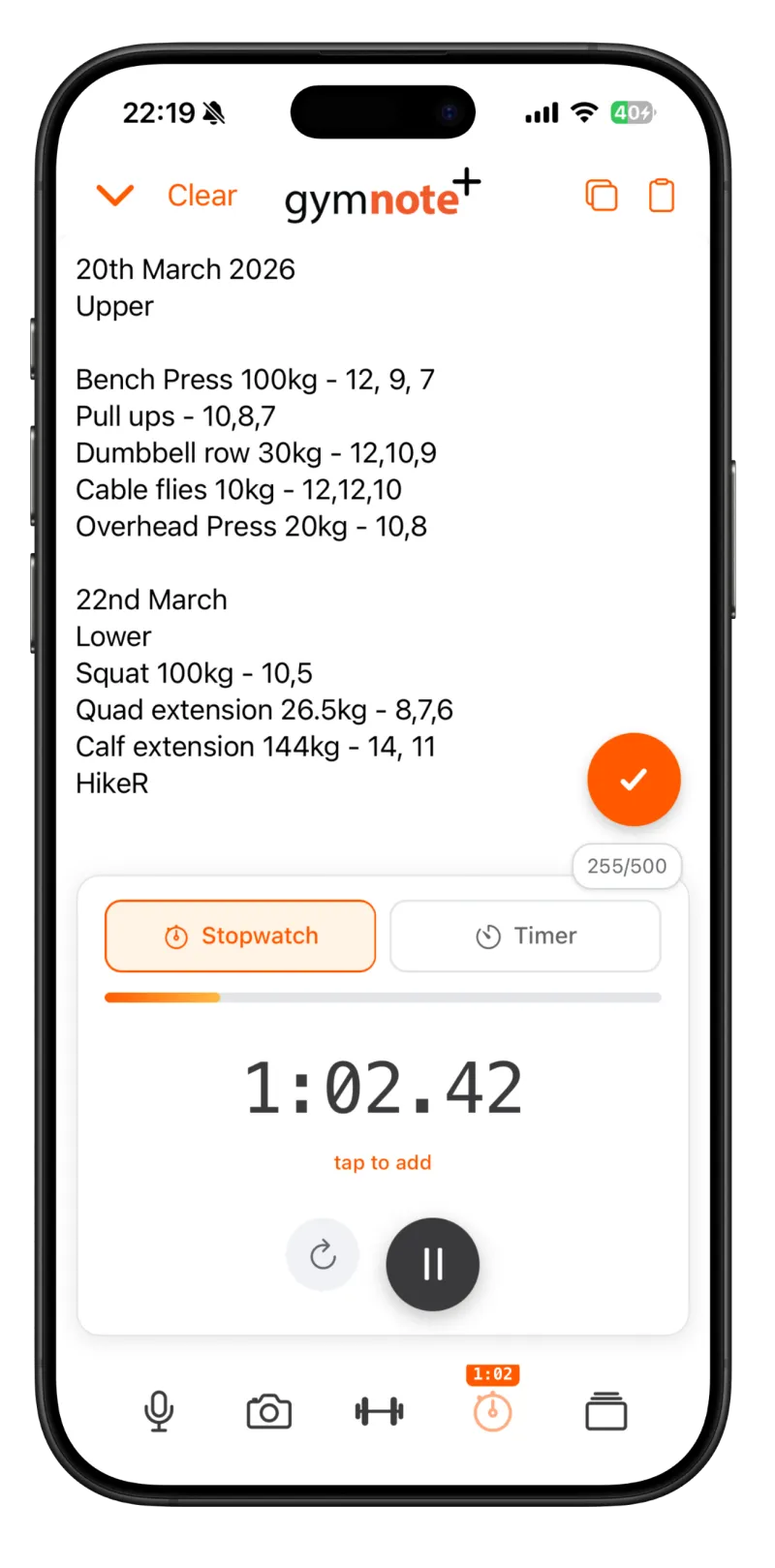
Write the workout the way you already do. The app parses it into structured data.
A huge share of lifters never adopted a structured tracker. They log in the Apple Notes app: "Bench 100kg, 12, 9, 7. Pull ups, 10, 8, 7." Fast, flexible, zero friction between sets. Also a dead end, notes can't chart anything.
GymNote Plus is built for exactly this person. You write workouts as free-form text, in whatever shorthand you already use, and the app parses it into a structured log: exercises, weights, sets, reps. "squat 3x5@135" works. So does messy multi-day shorthand. You can even photograph a paper notebook page and have it translated into tracked sessions.
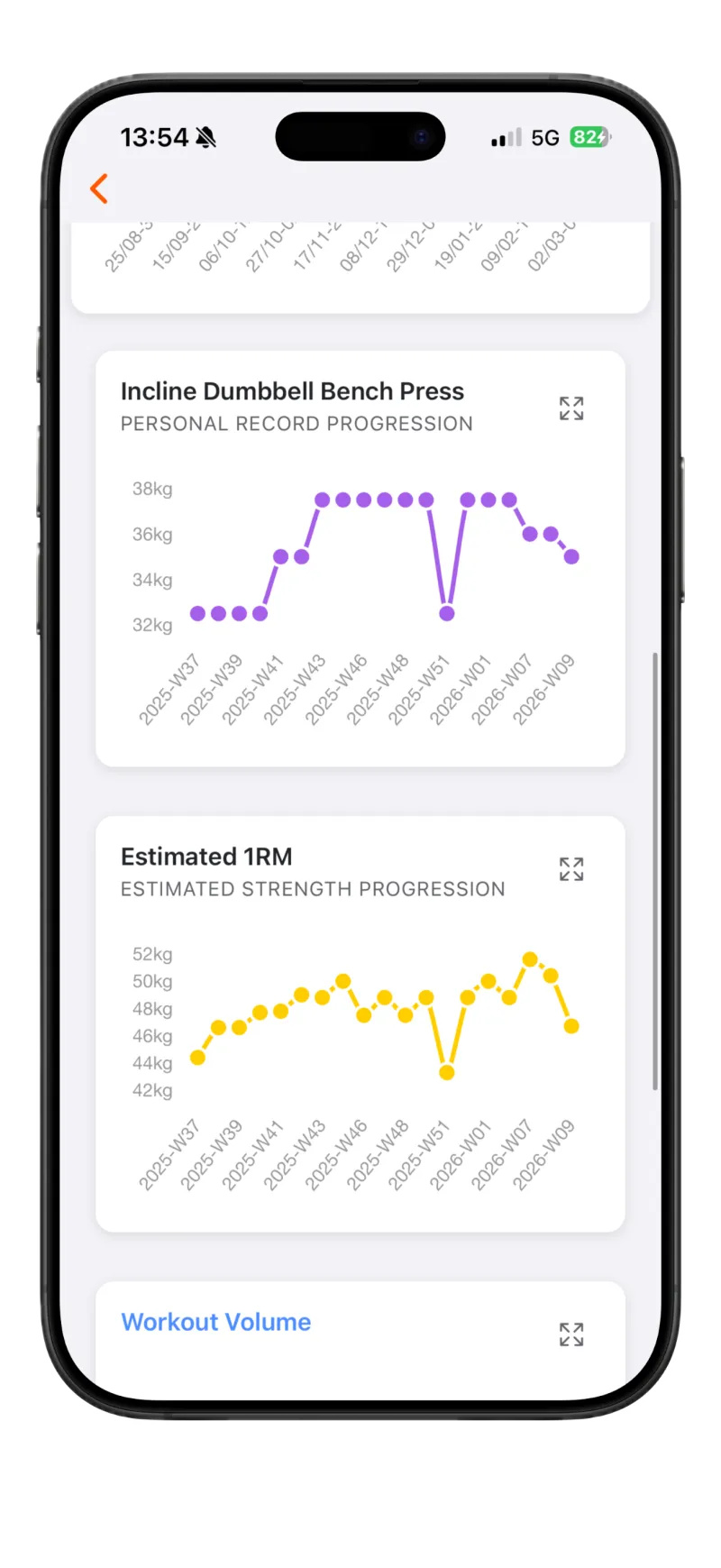
The notes become PR progression and estimated 1RM charts automatically.
From there you get what the structured trackers offer: a "workout to beat" view of your last session for today's muscle group, estimated 1RM progression, volume heatmaps, PR notifications, and full CSV export. It logs offline and syncs when you get signal back, relevant for basement and garage gyms.
It's a smaller app than Hevy or Strong, iOS only, a 4.6 rating on around 40 reviews, and a community in the low thousands rather than the millions. But it's the only app in this list that adapts to how you already write instead of making you adapt to it. If you've bounced off Hevy or Strong twice, start here.
5. Ladder, Best for coach-built programs
Platform: iOS App Store, Android · Price: Subscription after trial
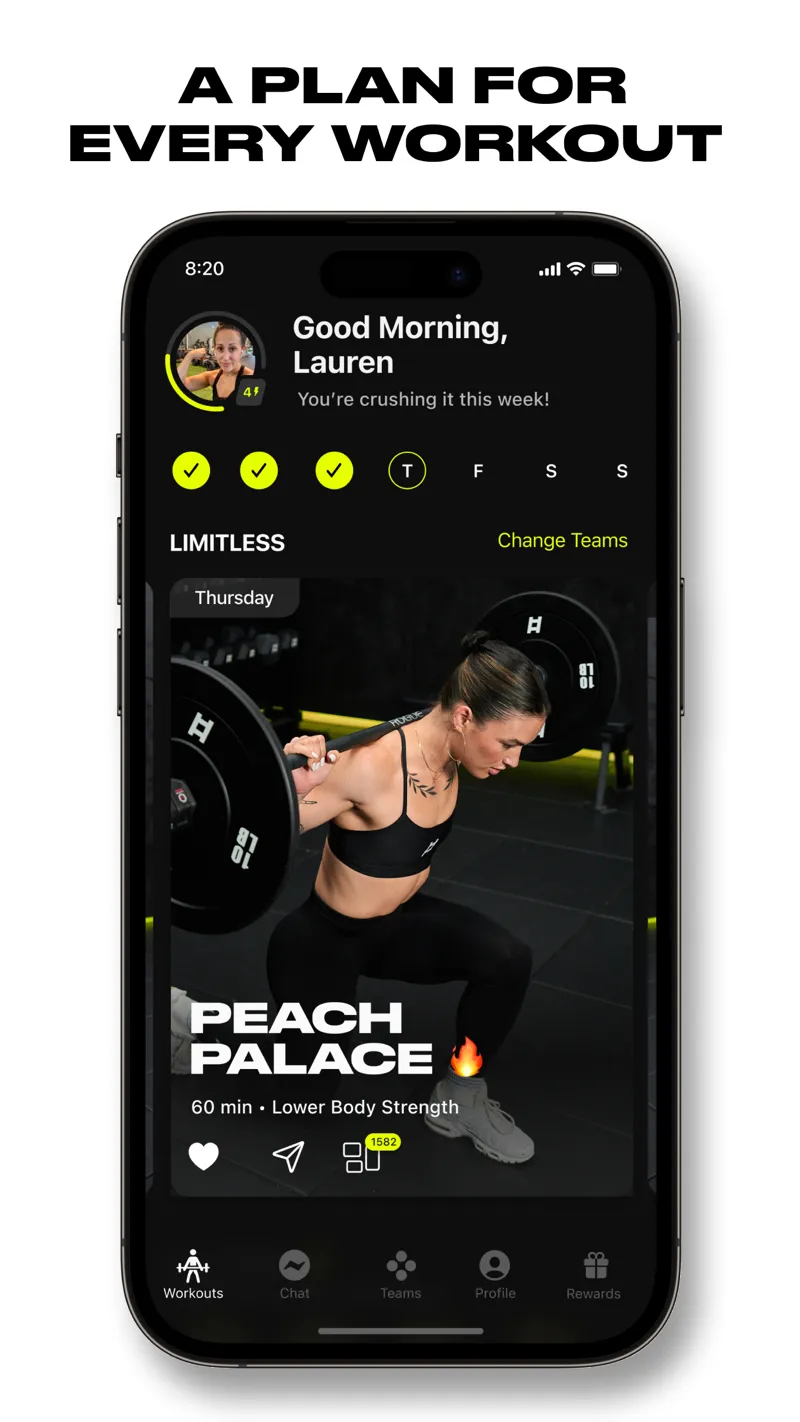
Ladder's week view: the day's coach-built session is already decided for you.
Ladder answers a different question than the trackers above. Hevy and Strong assume you have a program. Ladder assumes you want one, written by an actual coach, updated weekly, with video demos and audio cues for every movement.
You pick a team built around a training style (strength, hypertrophy, kettlebell, functional), and the programming arrives on a weekly cadence. Logging happens inside the workout as you follow along, so tracking is a byproduct rather than a chore. The community layer around each team supplies the accountability that solo programs lack.
The trade-offs are the mirror image of its strength. You're paying a real subscription, roughly the cost of a streaming bundle each month, and you're following someone else's plan. Lifters who love designing their own splits will feel boxed in. Lifters who are tired of program-hopping tend to stay.
6. Fitbod, Best for AI-generated workouts
Platform: iOS App Store, Android · Price: Subscription after trial
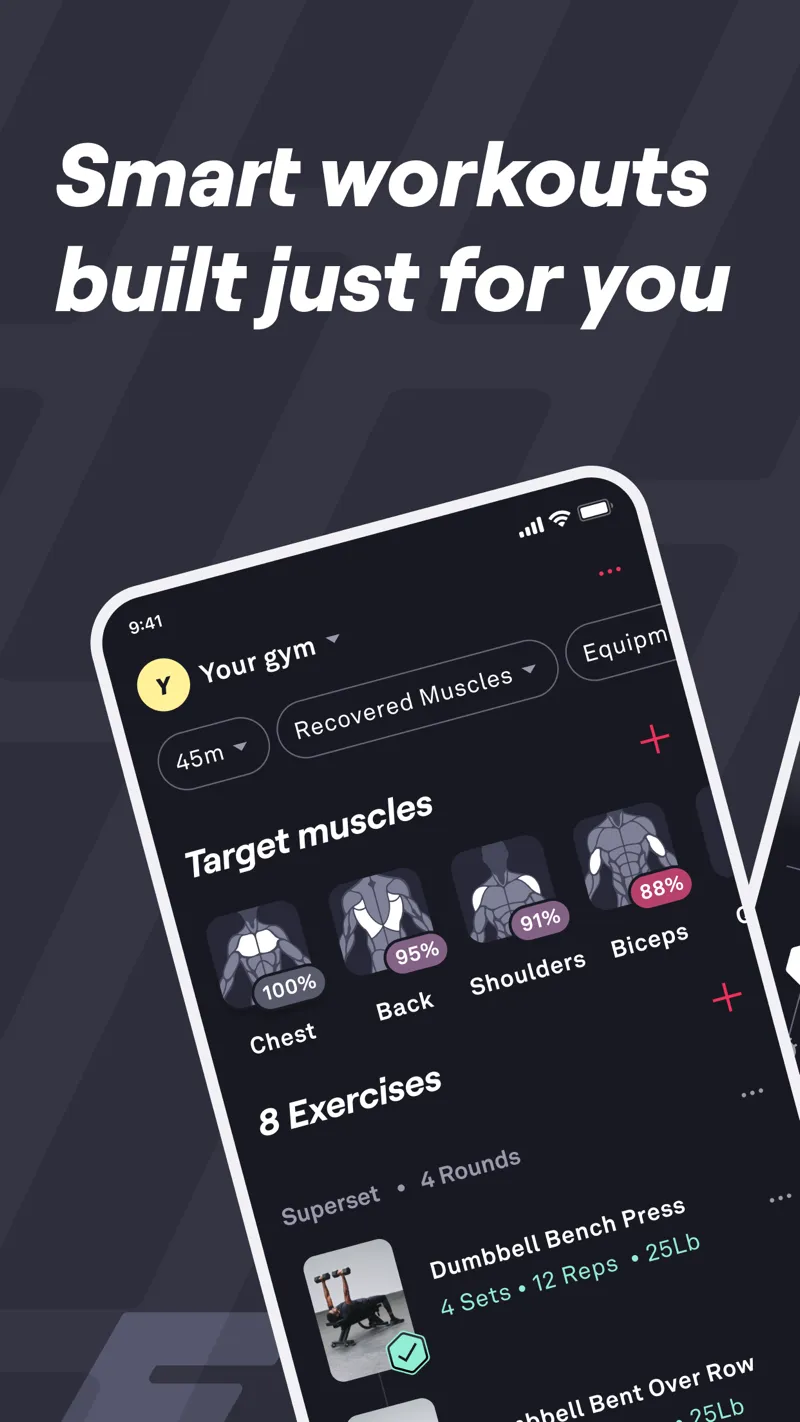
Fitbod's recovery model: each muscle group's freshness feeds the generated session.
Fitbod generates each workout algorithmically based on your available equipment, training history, and which muscle groups it estimates are recovered. Walk into any gym, tell it what you have, and it builds the session.
For beginners and travelers this is genuinely useful, no programming knowledge required, and hotel-gym workouts stop being improvised. The recovery model that rotates muscle groups is a real differentiator over static routines.
The limitation shows up for intermediate and advanced lifters: algorithm-generated sessions can drift away from the consistent, progressive structure that long-term strength gains need. If you already run a proven program, Fitbod's generator is solving a problem you don't have. We put its AI head-to-head with other coaching apps in GainFrame Coach vs Fitbod vs Ray vs GymStreak.
7. JustGains, Best free social workout platform
Platform: iOS App Store, web · Price: Free
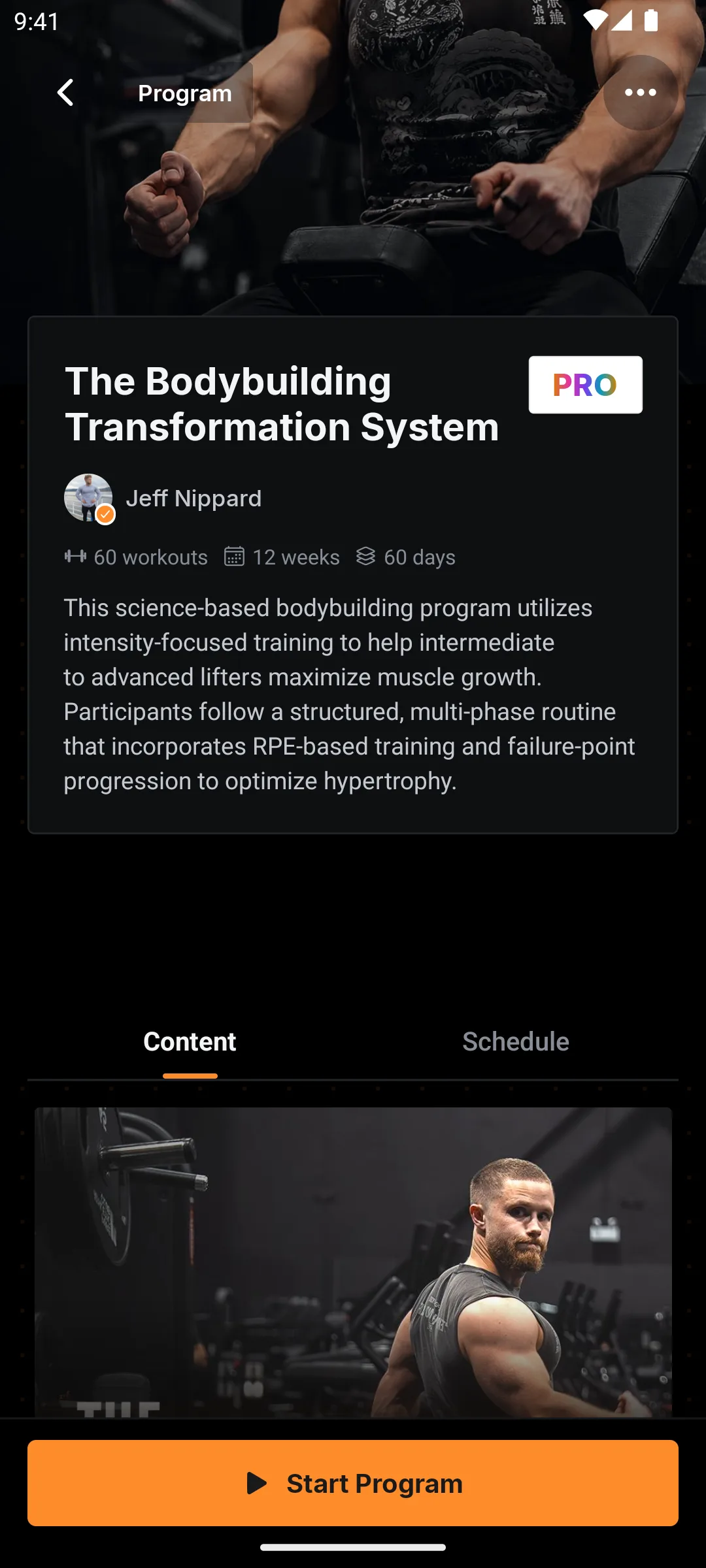
JustGains' native app: Jeff Nippard's 12-week Bodybuilding Transformation System, with 60 workouts and a one-tap start.
JustGains treats training as a social activity first. You log or build a workout, rest timers, supersets, and progress notes included, and it becomes a shareable routine your friends can follow. You can also follow creators and coaches, and pull structured routines from the community, with each movement linked to an exercise library entry showing the muscles worked and substitutions.
The price is the headline: the whole platform is currently free. Your data stays open too, the site offers one-tap import of your full history from another tracker, plus a public API if you ever want your numbers somewhere else. Cardio logs alongside lifting, so a run and a push day share one timeline.
JustGains now has a native iOS app alongside its web experience. The current 5.0 App Store rating comes from only 6 ratings, which is far too small a sample to compare with older trackers. The community is also young, so its social value depends heavily on who else you bring. Treat it as a free, low-risk option with promising early signals and a short track record.
How do the best workout tracker apps compare?
| Feature | Hevy | RIRLift | Strong | GymNote Plus | Ladder | Fitbod | JustGains |
|---|---|---|---|---|---|---|---|
| Logging style | Structured | Watch RIR logging | Structured | Free-form notes | Guided sessions | Generated sessions | Shared routines |
| App Store rating | 4.9 (80K+) | 5.0 (5; Sep 7) | 4.9 (108K+) | 4.6 (40) | 4.9 (160K+) | 4.8 (275K+) | 5.0 (6) |
| Free tier | Generous | Limited; verify watch access | Restricted routines | Free core | Trial only | Trial only | Everything free |
| Provides the program | Hevy Trainer (Pro) | Built-in program options | Coach-built | AI-built | Creator + community | ||
| Progression charts | Weekly muscle volume; Pro trends | Est. 1RM + PRs | Basic | Progress notes | |||
| Platforms | iOS, Android, web | iOS, Apple Watch | iOS, Android | iOS | iOS, Android | iOS, Android | iOS, web |
| Data export | CSV | CSV (Pro) | CSV | CSV + TXT | Open API |
Other apps retain their July rating snapshots; RIRLift was added September 7. Check current App Store listings before deciding.
Which workout tracker app should you pick?
The decision is less about which app is "best" and more about which logging philosophy matches your habits.
- Pick Hevy if you want structured logging, shared routines, and Apple or Android device support.
- Pick RIRLift if you want to log sets and RIR from Apple Watch with your phone in your bag.
- Pick Strong if you want the fastest possible log and nothing else on the screen.
- Pick GymNote Plus if you already write workouts in a notes app and want charts without changing how you write.
- Pick Ladder if you want a coach's programming and community accountability, and you're happy to pay for it.
- Pick Fitbod if you want each session generated for you around whatever equipment is in front of you.
- Pick JustGains if you train with friends and want everything free, shareable routines, creator programs, and open data on iOS or web.
How do you know the training is actually working?
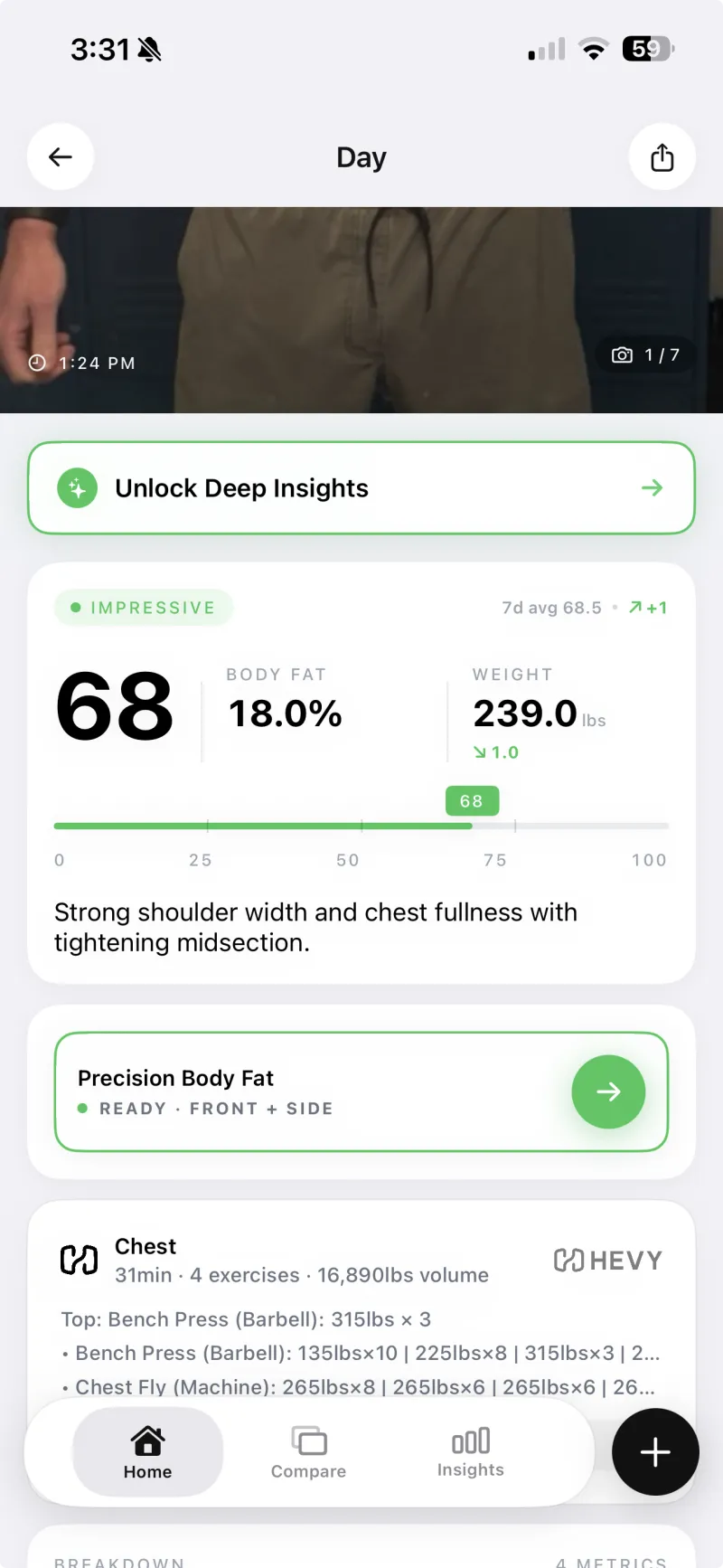
A Hevy session attached to the same day's photo check-in in GainFrame.
Your log records the work: sets, reps, volume, and performance trends. Hevy also supports progress photos and measurements, and RIRLift's release notes describe body measurements. Reviewing photos alongside the numbers can help you assess visible change over time.
That's the pairing worth knowing about. GainFrame tracks the output side, AI-estimated body fat, a physique score, and per-muscle-group ratings from weekly progress photos. It integrates with Hevy directly, so the day's training volume attaches to that day's photo check-in. The set data and the visual evidence end up on the same screen.
Whichever tracker you choose, the principle holds: log the inputs in one app, verify the outputs somewhere. A tracker proves you did the work. A photo timeline proves the work did something.
How to actually start (this week)
- Pick one app from this list using the decision guide above. Downloading three and comparing them for a month is procrastination wearing a lab coat.
- Log your very next session, even if it's mid-week and mid-program. The habit starts with one workout, and every app here makes the first log easy.
- Before each exercise, check last session's numbers. This is the entire point of tracking. Beat one number, one more rep, 2.5 more pounds, per session.
- Review your progression charts every 4 weeks. Estimated 1RM and volume trends flat for a month means something needs to change: sleep, food, or programming.
- Take a weekly progress photo alongside the log. Same day, same lighting, same pose. The lifts and the mirror should agree, and now you'll have evidence for both.
Frequently Asked Questions
What is the best workout tracker app in 2026?
Hevy is our default recommendation for shared routines and broad device support. RIRLift is the pick for Apple Watch logging with reps in reserve. Strong suits a minimal logging style, and GymNote Plus suits lifters who already write workouts as notes. Choose the workflow you will use consistently.
Can I track my workouts in my phone's notes app?
You can, but plain notes can't chart progress, calculate estimated 1RMs, or flag PRs. GymNote Plus bridges the gap: you write workouts as free-form notes, "Bench 100kg, 12, 9, 7", and the app parses them into a structured log with progression graphs, PR detection, and CSV export. Nothing changes about how you write.
What is the best free workout tracker app?
Hevy offers unlimited free workout logging with four saved routines. RIRLift also lists four active routines on its website, but its watch-access descriptions differ between the site and App Store. GymNote Plus has a free core, and JustGains currently offers free logging and sharing. Check each app's current limits.
Is JustGains actually free?
Yes, JustGains currently offers its whole platform free: workout logging, routine sharing, creator programs, AI plan building, and one-tap history import. It has an iOS app and a web experience. Its 5.0 App Store rating comes from only 6 ratings, which is too small a sample to judge long-term quality, and its community is still young. Confirm current pricing before committing your training history.
Is Hevy or Strong better?
For most lifters, Hevy, its free tier is more generous, it's actively developed, has a social feed, and it runs on more platforms. Strong remains the better pick for minimalists who want the fastest possible log with zero social layer. Both are excellent, and both export your data as CSV if you switch.
Do I need a workout tracker and a separate training program app?
Choose a program app if you want help deciding the session. Ladder supplies coached programming, and Fitbod generates workouts. Hevy Trainer now provides adaptive plans with Pro, while RIRLift also offers program-building options. You can still bring your own split to a flexible logger instead of using its suggested plan.
Do workout tracker apps track body composition or progress photos?
Hevy includes progress photos and body measurements, while RIRLift's release notes describe body measurements. Photo analysis is a separate capability. GainFrame offers AI estimates from progress photos and a direct Hevy integration, attaching workout context to photo check-ins. A separate photo habit works alongside either log.
See what the logged work is building
Use GainFrame for a separate photo check-in habit alongside any tracker on this list. Its direct Hevy integration attaches sessions to photo check-ins. Body fat, physique score, and 12 muscle ratings from a weekly photo. Free to start on iOS.
Download GainFrame Free