
Quick answer: Build a fitness app stack around the records you actually use: cardio sessions, lifting logs, nutrition, and consistent progress photos. This guide pairs Strava, Hevy, CalAI, and a photo tracker for those jobs. Check integrations and current plans before subscribing, and keep only the apps that help you maintain a useful routine.
You have four different apps on your phone. One for your runs. One for your lifts. One to scan your meals. And maybe, if you're serious about your body, one to actually track whether any of it is working visually.
That's not a problem. That's the right answer.
The best fitness apps in 2026 don't try to be everything. They go deep on one domain and integrate cleanly with everything else. A running app that also tries to track your macros is mediocre at both. The same logic applies to lifting, nutrition, and physique tracking.
This is the stack that serious gym-goers are running in 2026, and why each app earned its slot.
Running: Strava
Strava has been the default for endurance athletes for years, and it hasn't lost a step. Route tracking, segment leaderboards, and the social layer that makes a 5am run feel worth posting, it does all of it better than any general fitness app.
What keeps Strava at the top of the stack is its network. Your running data lives in a community. Segments give you something to race every time. And the activity feed creates genuine accountability that a lone tracking widget never will.
For the stack, Strava owns everything cardio: runs, rides, hikes. Keep your performance data there. Don't try to also log your lifts in it.
Lifting: Hevy
Hevy is what a modern lifting app should be. Clean interface, fast logging, solid progressive overload tracking. You can build any program, log any set, and see your volume trends over time without fighting the UI to get there.
The reason Hevy earned the lifting slot in this stack specifically comes down to data portability. Hevy doesn't lock your workout history behind a paywall or bury it in a proprietary format. That matters, because it means other apps can actually use that data in meaningful ways.
Log every set. Track your volume. Trust the numbers. Hevy is the ground truth for your training.
Prefer to log lifts from your wrist? Our Apple Watch workout logging comparison looks at RIRLift and Hevy for that workflow.
AI Physique Tracking: GainFrame
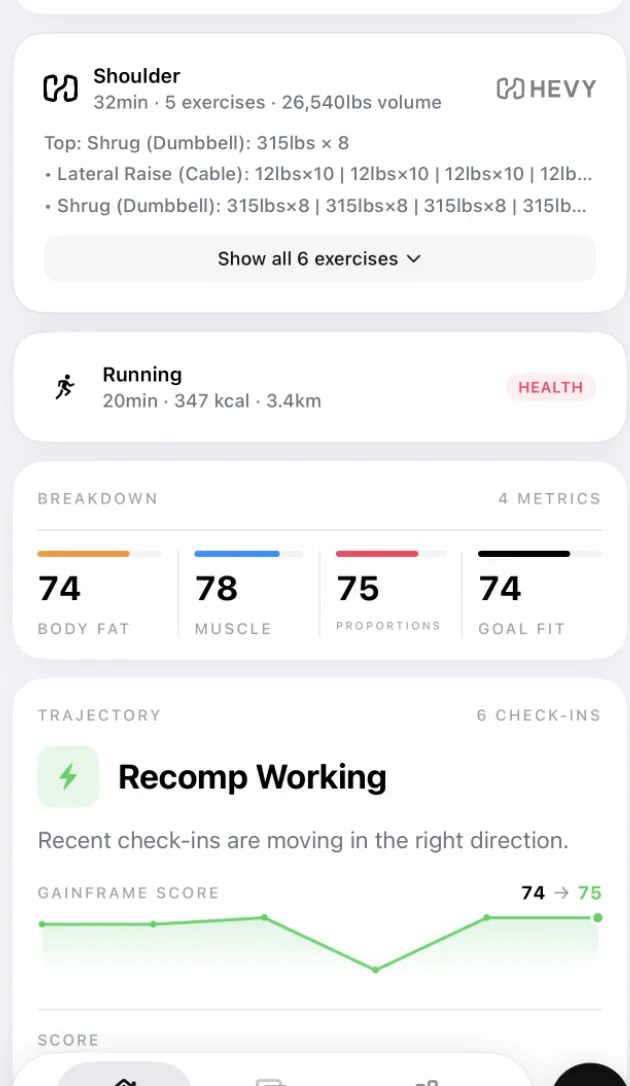
Strava tracks what your body does in motion. Hevy tracks what your body can lift. Neither one tells you what your body actually looks like, or how it's changing over time.
That's the gap GainFrame was built to fill. The same discipline that Strava and Hevy apply to their domains, GainFrame applies to your physique. AI-estimated body fat, visual muscle scores across 12 muscle groups, posture analysis, and a timestamped timeline of how your body has changed over weeks and months.
The hook that makes it fit this stack specifically: GainFrame integrates directly with Hevy. When you open any progress photo in GainFrame, you don't just see your AI scores, you see the workout you did that day. Exercise names, sets, reps, and total volume, all pulled from your Hevy history and pinned to that exact photo.
That context changes how you read your progress. Instead of eyeballing whether your chest looks bigger, you can see that three months ago you were pressing 135 and today you're pressing 185, and your muscle score confirms it. The visual evidence and the training data are in the same place.
Progress photos alone only tell you what you looked like. Progress photos with workout context tell you why you look the way you do.
Nutrition: CalAI
CalAI takes the single biggest barrier to consistent macro tracking, the tedium of logging every ingredient, and largely eliminates it. Point your camera at a meal, get a calorie and macro breakdown. The AI isn't perfect, but it's fast enough that people actually use it every day, which is the real metric.
Nutrition tracking works when it's frictionless. CalAI is the closest any app has gotten to that. It earns the fourth slot in this stack because it closes the loop: you're training hard (Strava + Hevy), your body is changing (GainFrame), and you're fueling it correctly (CalAI).
Why a focused stack beats one super-app
There are apps that try to do all of this, run tracking, lifting, nutrition, and progress photos, under one roof. They exist. None of them are best-in-class at any of it.
The reason is simple. Every feature you add to an app is a feature competing for engineering resources, design attention, and product focus. A company that builds the best lifting tracker in the world is making different choices than one that's also building a running tracker and a calorie counter.
The stack model wins because you get the best version of each domain. The integration layer, Apple Health, Hevy's open data, and direct app connections, handles the stitching. You're not giving up coherence. You're gaining depth.
How to set it up in 15 minutes
- Download Strava and connect it to Apple Health. Enable workout write permissions so your cardio activity is visible to other health apps.
- Download Hevy and log at least one workout. Enable Hevy's Apple Health integration to sync workout sessions.
- Download GainFrame and connect your Hevy account under Settings → Integrations. Take your first progress photo. GainFrame will automatically attach your Hevy workout data from that day.
- Download CalAI and log your meals for the rest of the day. Check your calorie and protein targets against your training goals.
- Commit to a weekly photo in GainFrame, same day, same lighting, same pose. Eight weeks from now, your timeline will start telling a real story.
Quick checklist: making the stack stick
- Strava: Log every run, ride, or hike, no manual entry. Use auto-detect if you forget.
- Hevy: Log in real time, not from memory. Include warm-up sets if your program calls for them.
- GainFrame: Take photos after training, same lighting each time. Enable Hevy sync so workout data is auto-attached.
- CalAI: Scan before you eat, not after. The estimation is more accurate when you can see portion size clearly.
- Review once a week: Check your GainFrame timeline Sunday morning. Compare AI scores. Adjust training or nutrition based on what you see.
You already track your runs and your lifts down to the meter and the pound. Your physique deserves the same precision. These four apps give you the full picture.
What else should you know?
What should a fitness app stack include?
Start with the records that help your routine: training sessions, nutrition when relevant, and consistent progress observations. You may want separate apps for cardio and lifting. Add another app only when it does a job your current tools cannot handle well. A useful stack should reduce the work of keeping those records.
Do you need both Strava and Hevy?
You may find both useful if you track cardio activities and detailed lifting sessions. The guide assigns those jobs to separate tools so each record stays easy to review. If you only need one of those records, start with one app. The number of installed apps is not a measure of training quality.
Should you track progress photos alongside workouts?
Consistent photos add a visual record beside the exercises, loads, and repetitions you log. Use similar lighting, pose, and distance so comparisons are easier to interpret. Photos do not isolate muscle or fat changes precisely. Read the visual history alongside training performance and any other measurements relevant to your goals.
Will these apps automatically share all their data?
No single integration guarantees that every field travels between every app. Check the current permissions and supported connections for the specific records you want to share. Confirm that a sample workout appears correctly before relying on the workflow. Keep a clear home for your original training history and review imports for missing details.
How can you keep a fitness app stack manageable?
Give each app a specific job, then review whether you actually use its records. Remove duplicate logging where possible and check renewal terms before adding paid tools. Begin with a small routine you can maintain. Expand only when you can name the question an additional app will help you answer.