
Quick answer: Choose Cronometer when detailed nutrient tracking and a useful free plan are your priorities. Choose MacroFactor Nutrition when you want calorie and macro targets adjusted using your logged intake and weight trend. Both require thoughtful food entries; neither can determine from your food diary alone whether you gained muscle.
You can hit a calorie target for a week and still have two different questions: whether your food choices cover the nutrients you care about, and whether that target matches your actual weight trend. Cronometer and MacroFactor organize those jobs differently.
Research basis: This comparison uses current first-party documentation checked September 6, 2026. It is not a personal app trial or a controlled weight-loss study. Michael Rode, founder of GainFrame, wrote it; our app records visual progress alongside the kinds of nutrition logs discussed here.
What is the main difference between Cronometer and MacroFactor?
Cronometer emphasizes detailed food and nutrient records, with a free entry point and optional Gold features. MacroFactor Nutrition emphasizes an adaptive planning loop: log food and weight, review the trend, and use its check-ins to adjust targets. Cronometer, MacroFactor Nutrition
This comparison concerns MacroFactor Nutrition. MacroFactor also offers a Workouts app, so a bundle offer should not be confused with the price or capabilities of the nutrition app alone.
| Your priority | Cronometer | MacroFactor Nutrition |
|---|---|---|
| Begin without an ongoing subscription | Free plan available | Premium app with a stated seven-day trial |
| Inspect nutrient detail | A central part of its food-tracking approach | Nutrient tracking alongside its coaching workflow |
| Adjust targets from intake and weight history | Review the target tools and settings you choose | Adaptive expenditure and regular target check-ins are central features |
| Log food from a photo | Available through Gold | AI-assisted logging is part of the current feature set |
| Judge visible body changes | Requires observations beyond a food diary | Requires observations beyond a food diary |
The feature distinction is about emphasis. It would be misleading to say MacroFactor only counts macros or that Cronometer cannot log food from a photo.
When is Cronometer the better fit?
Start with Cronometer if you want to inspect your food pattern before paying for a nutrition app. Its food diary and nutrient reports can help you identify which entries supply a nutrient and which foods deserve a closer look. The information still depends on the selected database entries and the amounts you log. Cronometer feature overview
A useful first exercise is to log a normal day, then inspect the entries behind one nutrient you care about. Check whether missing data reflects your diet or an incomplete food entry. A blank nutrient field should not automatically become a conclusion that you consumed none of it.
For a health condition or a prescribed diet, use the targets your clinician or dietitian recommends. A detailed dashboard does not independently establish a deficiency.
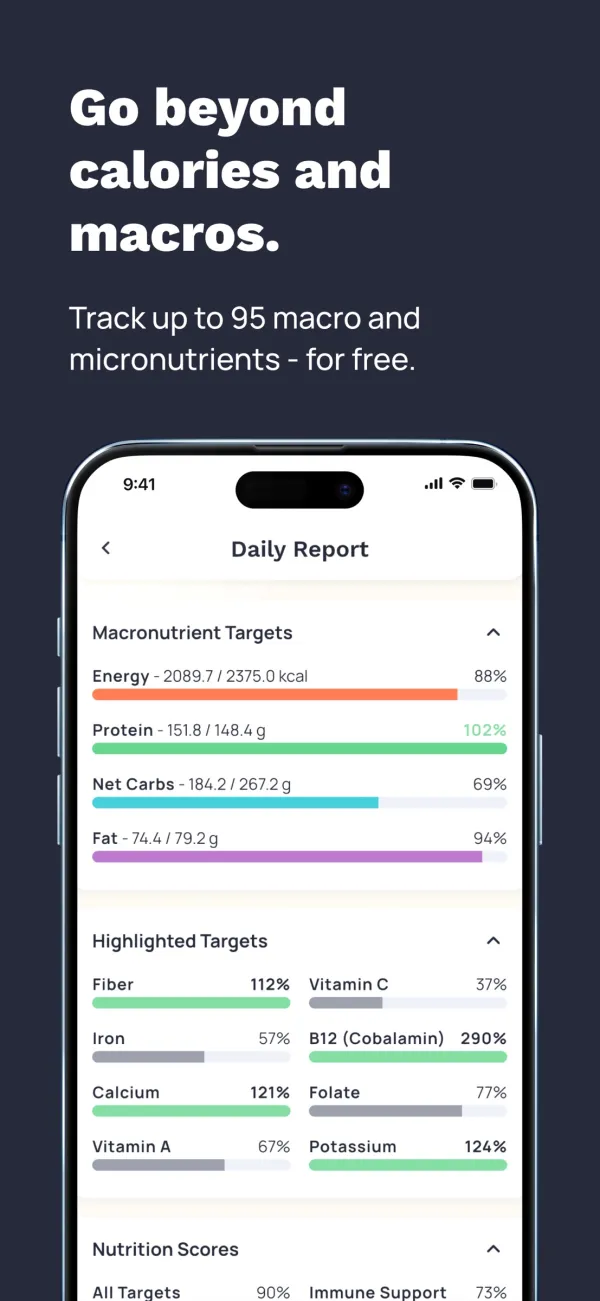
Cronometer's App Store image illustrates its Daily Report. The entries and totals are publisher-supplied examples. Source: App Store, accessed September 6, 2026.
When is MacroFactor the better fit?
Consider MacroFactor when your recurring problem is deciding how to adjust intake after observing your weight trend. Its documented value is the ongoing expenditure estimate and check-in process, rather than a single starting calorie calculation. MacroFactor product documentation
That loop needs an honest record. If you omit part of a day's food or enter a guessed amount as exact, the app cannot recover the missing information simply because it is adaptive. Consistency in logging gives the process a better chance of representing what you actually did.
If you want more detail about MacroFactor itself, use our existing MacroFactor review. The narrower question here is how its workflow compares with Cronometer.
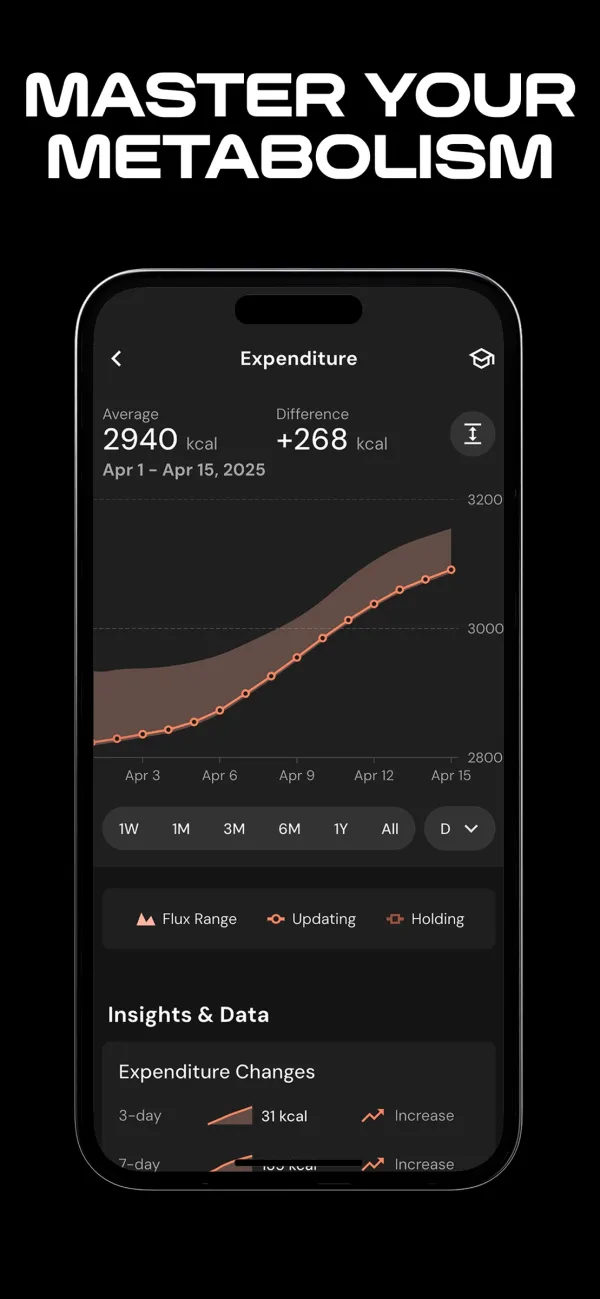
MacroFactor's App Store image illustrates its expenditure view. The displayed history is a publisher-supplied example. Source: App Store, accessed September 6, 2026.
Does either app remove the work of food logging?
Both offer shortcuts, but you still need to review what gets saved. Cronometer's Photo Logging documentation explicitly lets you change serving amounts and swap, add, or remove matched foods. Treat that review step as part of logging, especially when oils, sauces, or portion sizes are unclear. Cronometer Photo Logging support
Try this comparison using the same ordinary meals in whichever trials or free access you choose. This is a proposed exercise; we have not run the benchmark.
| Meal example | What to evaluate |
|---|---|
| A packaged breakfast | Can you find the correct item and serving unit quickly? |
| A repeated homemade meal | Can you reuse the recipe and adjust the portion? |
| A restaurant meal | Can you review uncertain ingredients without false precision? |
| A meal you forgot to log | Can you correct the day without leaving a misleading partial record? |
Time the whole workflow, including corrections. A fast initial photo match is less useful if fixing the entry takes longer than entering the meal another way.
Which is better for body recomposition?
Choose according to the nutrition task you will maintain. Neither diary can establish muscle gain from food entries alone. Pair nutrition records with training and consistent observations relevant to your goal.
A simple monthly review can ask: did you log consistently, complete the training you planned, and observe a useful longer-term change? If your goal involves appearance, use consistent progress photos. If you need to decide between gaining, losing, or maintaining weight, the existing bulk, cut, or recomp guide covers that separate decision.
Avoid switching apps every time one week looks confusing. First determine whether the problem is the software, incomplete entries, or the expectations you brought to the target.
How should you compare the subscription cost?
Compare the plan you would actually use. Cronometer's free tier and paid Gold tier are different offers; MacroFactor Nutrition is a paid app after its available trial. Check Cronometer Gold and MacroFactor's current product page for the terms shown in your region and purchase route.
The useful calculation is annual cost divided by months you realistically expect to use it. A free app you maintain can be more valuable to you than a paid workflow you abandon. Paying can also be reasonable when a specific feature removes recurring effort.
Which sources support this comparison?
We used each company's own Cronometer product pages and MacroFactor documentation, plus Cronometer's photo-logging instructions. MacroFactor publishes its own competitor comparison; its ranking is a vendor's opinion, not independent evidence of better outcomes. Our recommendations are conditional judgments about workflow.
What else should you know?
Is Cronometer or MacroFactor better for beginners?
Cronometer is a reasonable starting point if you want to learn food logging without an ongoing subscription. MacroFactor may suit you if you already want an adaptive target-setting workflow. Try the app on meals you normally eat and judge how easily you can review and correct entries before committing.
Does Cronometer have photo logging?
Yes. Cronometer documents Photo Logging as a Gold feature. It identifies possible foods and lets you review the matches, adjust amounts, and add or remove entries before saving. That review is part of the task; a photo cannot reliably reveal every ingredient, cooking addition, or portion detail by itself.
Does MacroFactor track more than macros?
Yes. Its current product documentation includes nutrient tracking as well as calorie and macro planning. The main reason highlighted in this comparison is its adaptive expenditure and check-in workflow. Choose based on the reports and decisions you need rather than assuming its name limits it to three macronutrients.
Which app is better for building muscle while losing fat?
Neither app can guarantee that outcome or verify muscle gain from a diary. Choose the nutrition workflow you can maintain, then interpret it alongside training and other relevant observations. Cronometer emphasizes nutrient detail and free access; MacroFactor emphasizes adjusting targets from the intake and weight history you record.
Should you log the same food in both apps?
A brief comparison using a few normal meals can help you judge usability. Keeping two full diaries indefinitely adds work and can create conflicting records. Once you choose, maintain one primary nutrition history and review incomplete or uncertain entries before treating a difference in calculated totals as meaningful.
Keep a visual record of your progress
Use GainFrame on iPhone to organize progress photos and compare check-ins. Photo estimates have limits; a consistent visual history gives you another observation alongside your logs.
Get the app for iPhone