
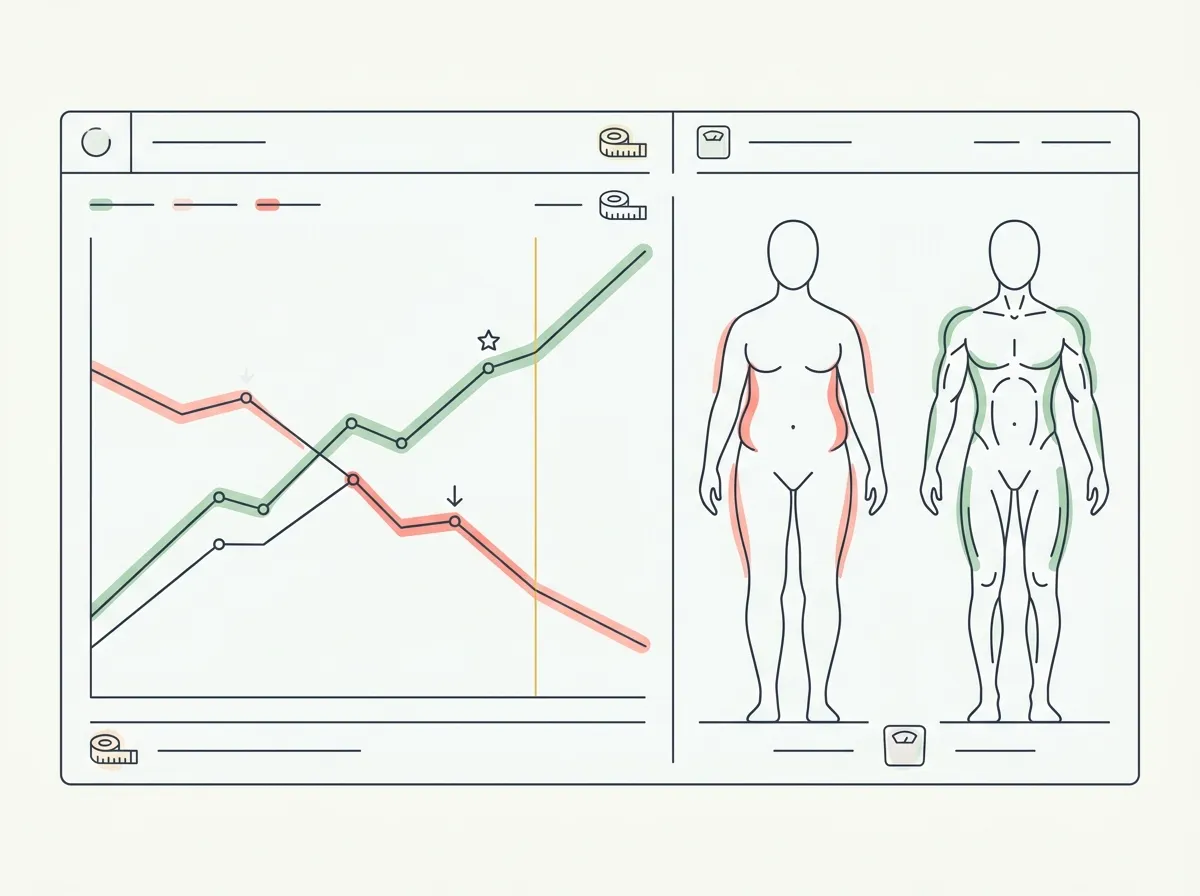
Quick answer: The best body recomposition app depends on the job. GainFrame combines photo-based composition tracking with calorie and macro targets plus flexible food logging. MacroFactor remains the strongest dedicated option for adaptive nutrition targets, while Hevy handles training progression. You still need all three functions, even when one app covers more than one.
You finish a twelve-week recomp block. You weigh exactly what you weighed in week one. Same number on the scale, three months later.
But your shirts fit differently, your arms look fuller, and your lifts went up. That gap between a flat scale and a changing body is the entire problem with tracking body recomposition. It is the one fitness goal a bathroom scale is structurally incapable of measuring.
So people go looking for a "body recomposition app," expecting one tool that does everything. That app does not really exist. What exists is a set of apps, each good at one of the three jobs recomp actually requires. This guide ranks the six best by the job they do.
For two narrower decisions within a recomp routine, see Cronometer versus MacroFactor for nutrition logging and targets and the Gravl workout-planning evaluation. Each focuses on one part of the routine rather than replacing this app-stack overview.
What is body recomposition, and why is it so hard to track?
Body recomposition means losing fat and building muscle at the same time. Because the two changes partly cancel out on the scale, your bodyweight can sit still for months while your body changes underneath it.
That breaks the default tracking tool. To actually see recomp you have to track three things the scale never shows: body composition (how much of you is fat versus muscle), nutrition (a calorie and protein target precise enough to drive the trade), and training (progressive overload that signals your body to keep the muscle).
No single app is excellent at all three. If you want the deeper mechanics, we cover them in how to track body recomposition with progress photos and bulk, cut, or recomp: which should you actually choose. This guide is about the tools.
What are the best body recomposition apps in 2026?
Here are the six, ranked by how well they do their core job and how directly that job moves the recomp needle. The table compares them on the dimensions that matter; the breakdowns below explain who each one is for.
| Feature | GainFrame | MacroFactor | Hevy | Recomp AI | BodyRecomp | Recomp (beta) |
|---|---|---|---|---|---|---|
| Primary job | Body composition | Nutrition / macros | Training log | AI nutrition coach | Meal + workout plans | Measurements + photos |
| Body fat & muscle tracking | Advertised | |||||
| Progress photos + AI analysis | Advertised | |||||
| Nutrition / macro logging | Targets + food log | |||||
| Workout / strength log | Hevy import | Plans | ||||
| Adaptive AI insights | Advertised | |||||
| Platform | iOS | iOS + Android | iOS + Android | iOS | iOS + Android | Not listed |
| Free tier | 25 photos | Trial only | Unknown | Trial only | Waitlist | |
| Pro price | $5.99/mo · $39.99/yr | $5.99 to $11.99/mo | $5.99/mo · $34.99/yr | Not public | ~$30/mo | $39.99/yr (advertised) |
1. GainFrame: best for tracking the body composition change
Recomp is invisible on the scale, so the app that measures the change directly is the one that answers the question you actually care about: is this working? GainFrame is built around that question.
You take a photo, and its AI returns a body fat estimate, a physique score, and individual scores for 12 muscle groups labeled Needs Work, Developing, or Strong. Over weeks, the Compare view stacks two photos side by side with the body-fat and weight delta overlaid, so a recomp that the scale hides shows up as a measurable trend.
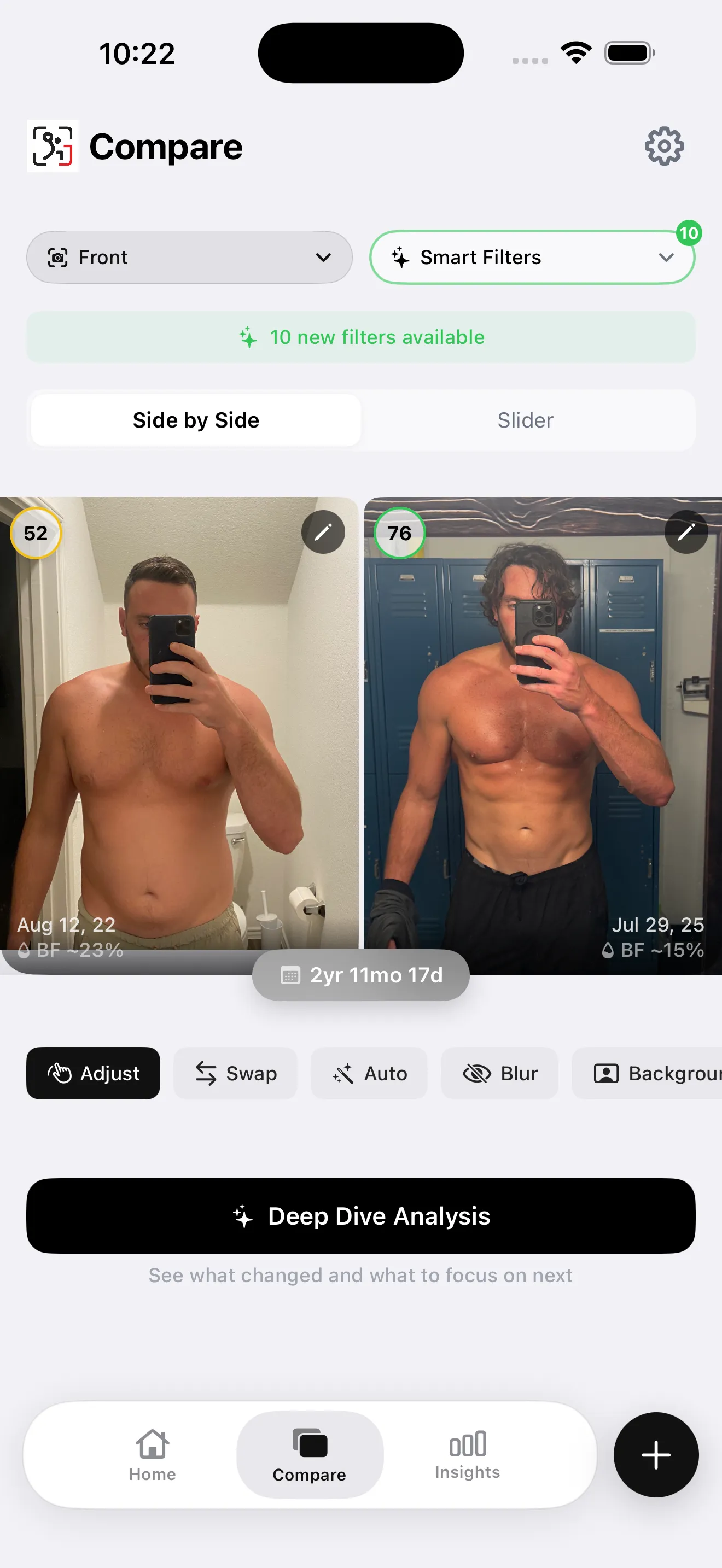
GainFrame's Compare view: the body-fat delta the scale can't show.
The per-muscle map is the recomp-specific edge. Recomposition is uneven. Your shoulders might recomp while your midsection lags, and a single body-fat number hides that. GainFrame scores each region so you can see where the muscle is actually landing.
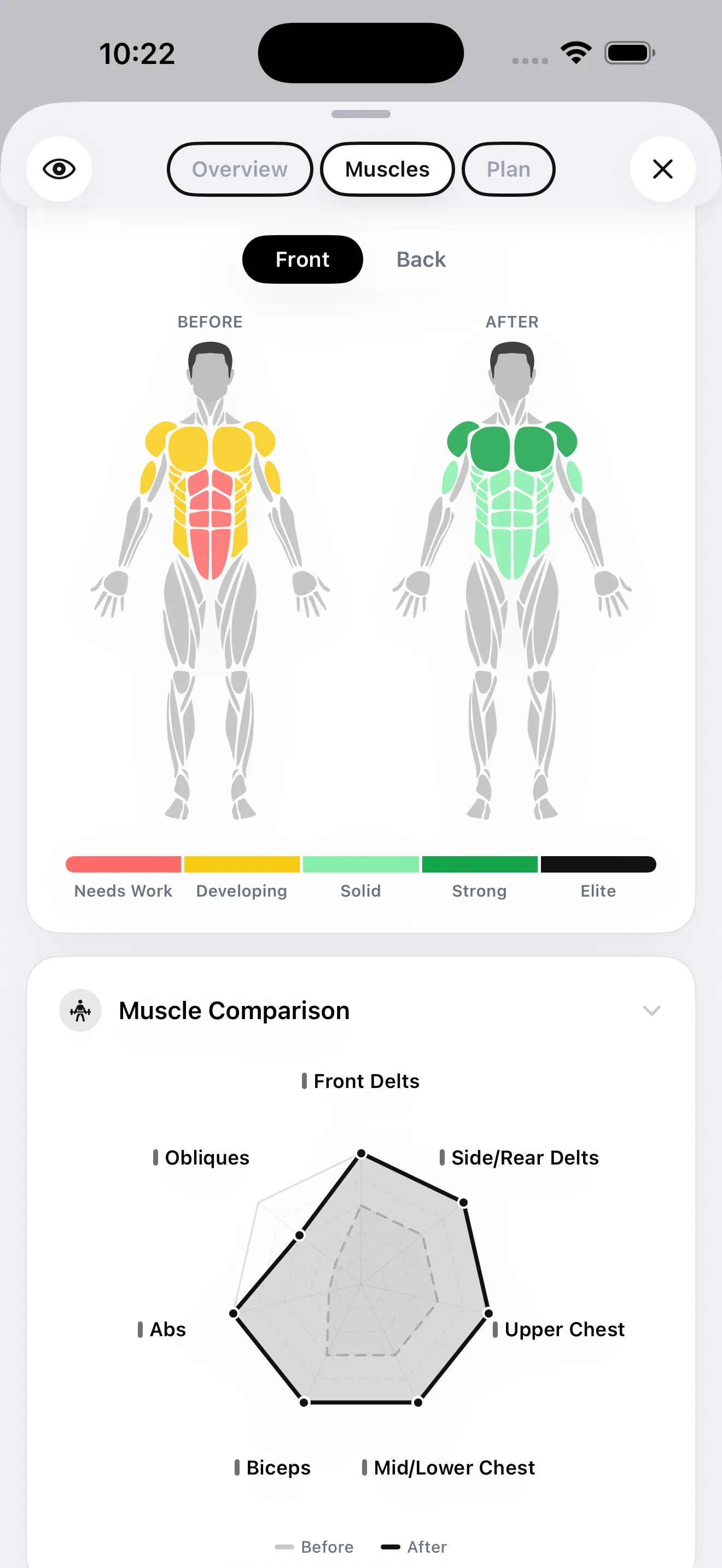
Per-muscle scoring shows which regions are recomping and which are lagging.
It is honest about what it is: AI estimates from photos, generally within roughly 2 to 4 percent of a DEXA scan for most users, not a clinical measurement. Photos are processed by Google's Gemini model for the analysis and are not stored on any server. The free tier caps at 25 photos lifetime, and Pro is $5.99 per month or $39.99 per year. It is iOS only.
The nutrition suite now sets calorie and macro targets and lets you log food by voice, search, barcode, Nutrition Facts label, or plate photo. Entries can sync calories, protein, carbohydrates, and fat with Apple Health. You review matches and portions before saving, which matters because photo and voice inputs still need confirmation.
Best for: lifters who want to see the recomposition the scale denies while keeping their calorie and macro log beside the photo trend. It does not generate a full workout program, so you still need an existing routine or a dedicated training app.
If a visible weak area needs more attention, Target Training turns that assessment into supplemental exercise suggestions while still leaving your full workout program to you, your training app, or your coach.
Baseline yourself first: the free body-fat-from-photo tool runs the same AI in your browser. One scan a day with no signup is enough to mark your starting point before the recomp.
2. MacroFactor: best for the nutrition side
Recomposition lives or dies on a precise calorie and protein target, and MacroFactor is the sharpest tool for that. Built by the Stronger By Science team, its adaptive algorithm recalculates your real energy expenditure each week from your weight trend and logged intake.
After two to three weeks of consistent logging, that estimate is typically within 50 to 100 calories of your actual expenditure. That is much tighter than formula-based calculators, which can miss by several hundred. For a recomp, where the calorie margin is narrow, that precision is the point.
It is a dedicated nutrition app, so it does not track body composition or your lifts. Logging is manual. Pricing runs from $11.99 per month down to $5.99 per month on the annual plan, with a free trial rather than a permanent free tier.
Best for: the diet half of recomp. Pair it with a body-composition app to confirm the target is actually producing the trade.
3. Hevy: best for the training side
Muscle retention during a recomp depends on progressive overload, and you cannot progressively overload what you do not measure. Hevy is the cleanest strength log for that job, and its free tier is unusually complete.
You log sets, reps, weight, and RPE, and Hevy tracks volume, personal records, and progression on each lift over time. If your squat and row numbers climb while your body-fat trend drops, that is recomposition confirmed from the training side. The free plan covers unlimited workouts; Pro adds advanced analytics for $5.99 per month or $34.99 per year.
GainFrame integrates with Hevy directly, attaching the day's training volume to that day's photo. The workout context and body-composition result sit on the same check-in.
Best for: the gym half of recomp, on a free tier most lifters never need to upgrade.
4. Recomp AI: best for hands-off nutrition coaching
Recomp AI (by Cristian Contreras) takes the nutrition job and wraps it in an AI chat coach. Based on its App Store listing, you log food by typing, voice, a meal photo, or a barcode, and it gives daily and weekly reviews of what changed and why, nudging small corrections when progress stalls.
It keeps a private memory across chats so the coaching stays consistent over time. It is an iOS nutrition tool. It does not track body composition or your lifts, and its pricing is not listed publicly, so check the App Store before committing.
Best for: people who want macro guidance to feel like a conversation rather than a spreadsheet.
5. BodyRecomp: best for an all-in-one plan
If you would rather be handed a plan than assemble a stack, BodyRecomp bundles meal plans and workout plans tailored to a recomposition goal. It leans toward structure over measurement. You follow the plan rather than logging granular data.
Based on its App Store listing, pricing runs around $30 per month, $45 for three months, or $75 for six months. That is notably steeper than the focused tools above. It is the convenient option, not the precise one.
Best for: beginners who want a done-for-you meal and training plan in a single app and are willing to pay a premium for the bundle.
One to watch: Recomp (getrecomp.app)
A pre-launch app at getrecomp.app is taking direct aim at the body-composition tracking job with measurements, progress photos, AI insights, and a ghost-overlay camera. It advertises privacy-first design and annual pricing at $39.99. On paper it overlaps heavily with the measurement layer.
As of this writing it is a waitlist, not a shipping app, so there is nothing to test and no reviews to verify. Worth bookmarking; not yet worth recommending.
Which body recomposition app should you actually use?
Stop looking for the one app that does everything. Match the tool to the job, and add tools only as you need them.
- Start with measurement. Pick a body-composition app so you can actually see the recomp. If you train on iOS and want photos plus per-muscle scoring, that is GainFrame.
- Add nutrition control. If you use GainFrame, start with its calorie and macro targets plus food log. Add MacroFactor when you specifically want adaptive expenditure targets and deeper nutrition coaching.
- Add training tracking. If you are not already logging lifts, add Hevy so you can confirm progressive overload, the training signal that matters during a recomp.
- Reassess every four to eight weeks. Recomp is slow. Judge it on the body-fat trend, photos, and lift numbers across a month or two, never on a single weigh-in.
Most lifters still end up running at least two apps. Measurement, nutrition, and training are three different jobs. GainFrame can cover the first two. Its workout support supplements an existing program, which leaves a dedicated training log useful.
The scale is the wrong instrument for recomposition. Pick the tool that measures what actually changed, then make sure nutrition and training are represented in the same workflow or the rest of your stack.
Frequently Asked Questions
What is the best app for body recomposition?
There is no single best recomp app, because recomposition is three jobs. For tracking body composition from photos, GainFrame is the strongest pick. For nutrition, MacroFactor leads with adaptive macro targets. For training progression, Hevy is the best free strength log. Most serious lifters run one app per job.
Can one app track body recomposition completely?
Not well. Recomposition means gaining muscle while losing fat, which requires measuring body composition, controlling calories and protein, and progressing your lifts. Most apps do one of those three jobs well and the others poorly. A focused stack of two or three apps usually beats one all-in-one app that does everything at a shallow level.
How do you track body recomposition without a scale?
During recomp the scale can stay flat for months because fat lost roughly equals muscle gained. Track body fat percentage, progress photos, lift numbers, and tape measurements instead. Apps like GainFrame estimate body fat from photos and score individual muscle groups, so you can see the recomp the scale hides.
How accurate is AI body fat tracking for recomposition?
AI photo estimates generally land within roughly 2 to 4 percent of a DEXA scan for most users, based on typical real-world reports. They are approximations, not clinical measurements. For recomp the trend over four to eight weeks matters more than the absolute number, and AI estimates are consistent enough to show that trend.
Do I need both a nutrition app and a workout app for recomp?
You need both functions. They do not require two separate apps. GainFrame now pairs photo-based composition tracking with calorie and macro targets plus food logging, while a strength log like Hevy handles progressive overload. A dedicated nutrition app such as MacroFactor is still useful if you want adaptive expenditure targets or deeper nutrition coaching.
How long does body recomposition take to show up in an app?
Visible recomposition usually takes 8 to 12 weeks to register in progress photos and body-fat trends, longer as you move from beginner to advanced. Strength numbers move first, body composition next, and the mirror last. Tracking from week one is what makes the slow change measurable before you can see it.
See the recomp your scale is hiding
GainFrame estimates body fat from a photo, scores 12 muscle groups, and stacks any two check-ins side by side with the delta overlaid. Its calorie and macro targets plus food log keep the nutrition side beside the trend. Estimates are not clinical measurements. Free for your first 25 photos, iOS.
Download GainFrame Free