
Quick answer: Hevy is a strong fit for lifters who want workout logging, reusable routines and optional social accountability. Its native measurements and private progress photos can cover a basic body-progress record. Pro expands limits and adds Trainer. Choose it by your routine and review needs, not by the assumption that photos require another app.
You have four lifting days, three months of logged sets, and a folder of photos that never makes it into your review. A useful Hevy app review should answer two questions: can it run your training log, and can it keep the body changes beside that log?
Hevy already does more of the second job than many comparisons acknowledge. This is a sourced evaluation of its current product, US App Store listing and help documentation checked October 27, 2026. It is published by a progress-photo app maker, not an independent hands-on test; the screenshots below are Hevy's own marketing images.
Who is Hevy best for in this app review?
Hevy suits lifters who want a reusable workout log, visible previous sets and an optional social feed. You can bring an existing program, browse routines or use the new Hevy Trainer option in Pro. Its current App Store listing describes Trainer as personalized programming and guidance, so the old claim that Hevy never helps plan training is out of date.
The strongest reason to choose it is continuity: the same exercise, the last performance and today's result stay connected. That makes a log useful between sets. A long feature list matters less if you repeatedly skip recording the last two exercises.
Platform: iOS App Store and Android. US rating checked October 27: 4.92/5 from 100,157 US ratings.
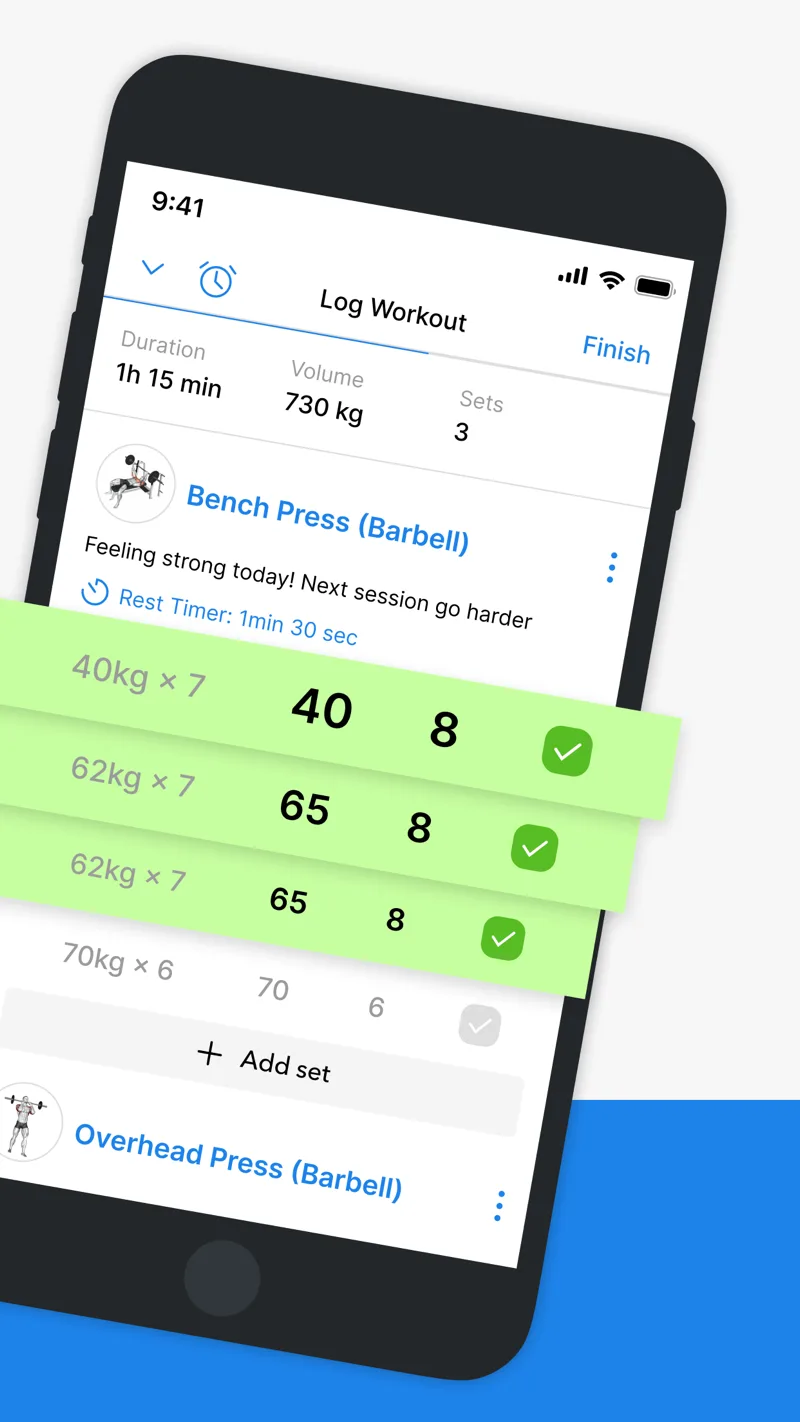
Publisher screenshot from Hevy’s current US App Store listing. The screen shows set logging; it is not evidence of our own workout test.
What do free Hevy and Hevy Pro include?
The official free-versus-Pro explanation makes the practical limits clearer than “free to download.” You can keep logging without a subscription. Pro expands routines, custom exercises, chart history and body measurements; the current listing also includes Trainer.
| Need | Free | Pro |
|---|---|---|
| Saved routines | Up to 4 | Unlimited |
| Custom exercises | Up to 7 | Unlimited |
| Statistics graph range | Up to 3 months | Year and all-time options |
| Body measurements | Weight and waist | Expanded measurement fields |
| Personalized Trainer | Not listed for Free | Included in current listing |
A four-day upper/lower split may fit within the free routine allowance. A six-day schedule with separate travel and deload templates is a different use case. Start with your actual templates rather than subscribing because a review says serious lifters need Pro.
Hevy offers monthly, annual and lifetime purchase options. Compare the current checkout in your country before paying; a lifetime purchase and an existing subscription should not be assumed to cancel each other. The documented downgrade policy retains previously created routines and historical measurements even when you cannot add more of some types.
Can Hevy track progress photos and body measurements?
Yes. Hevy's Measures documentation describes gallery import, backdating, a camera overlay and comparisons. A measurement entry can contain a photo or stand alone. There is one progress photo per day, which matters if your normal check-in contains front, side and back views.
The same help page distinguishes free weight and waist entries from the wider Pro measurement set. It also says progress photos remain private unless you share them outside Hevy. That is different from attaching media to a social workout post; choose the right destination before uploading.
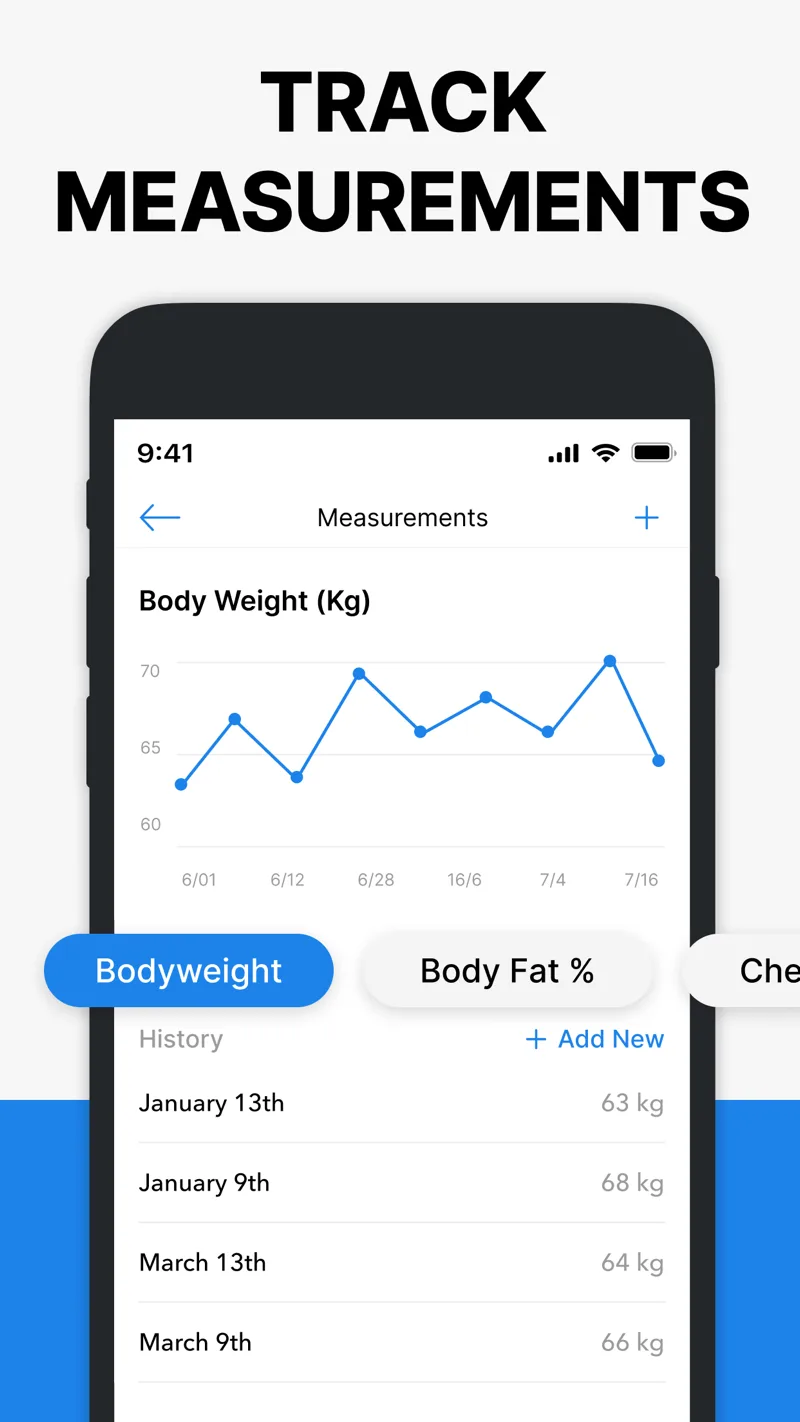
Publisher screenshot showing the measurement record. The progress-photo workflow is documented in the help centre linked above.
A logged body-fat value is a record of a value you supplied. The documentation does not present it as a body-fat measurement created from the photo. Keep the measurement method in your notes so a new scale or technique does not look like a sudden change in your body.
How should you read Hevy's progress charts?
Use charts to answer a specific question. Did your repetitions improve at the same load? Did you complete the planned sessions? Did the same lift improve with comparable technique? Total volume alone can increase because you added sets, changed exercises or counted a different machine.
Here is a review sheet you can copy for a training block. It is an editorial template, not a set of results from testing Hevy.
| Record | Keep consistent | Review question |
|---|---|---|
| Anchor lift | Exercise, technique, range and effort | More reps or load under similar conditions? |
| Attendance | Planned versus completed sessions | Was the plan actually followed? |
| Waist or weight | Method, time and recording habit | Is there a sustained pattern? |
| Photo | Pose, light, distance and date | Does the same view look different across the block? |
When those records disagree, inspect the setup before changing your plan. A stronger bench and a similar-looking photo are not contradictory findings. Performance and visible appearance answer different questions, and short intervals make visual comparisons especially fragile.
When would another app add something useful?
If you only need one dated photo beside a measurement, try Hevy's native feature first. There is no reason to build a three-app workflow for a task one app already handles. If you are choosing between logging styles, our Hevy versus Strong comparison covers that separate decision.
A dedicated photo workflow becomes more relevant when you want a larger historical library or repeated poses organized separately from workouts. GainFrame's Hevy integration can place workout context beside photo check-ins. It is iOS-only, and its photo-based composition outputs are estimates; selected photos leave the device for AI processing while the photo library is stored on-device.
Before adding anything, compare two existing photos in the free progress-photo comparison tool. If the lighting, crop and pose differ substantially, improve the capture routine first. Extra software cannot make two incompatible pictures into a reliable record.
What should you check during your first week?
- Build the routines you actually repeat, including any alternate equipment day.
- Log the completed load and repetitions, not the prescribed values when you changed them.
- Open Measures and try one historical photo with its correct date.
- Check workout visibility separately from private progress photos.
- Identify the exact paid feature you need before choosing a billing period.
Our workout tracker comparison is useful if the first week reveals a different requirement. Stay with the simplest log you will complete consistently, then review a full training block before judging the body changes.
What else should you know before choosing?
Is Hevy free to use?
Hevy has an ongoing free tier for workout logging. Its published limits include four routines, seven custom exercises and a shorter statistics history range. Pro adds expanded limits and features. Start with the free version using your real training schedule, then check the current purchase screen if you need something beyond it.
Does Hevy have progress photos?
Yes. The Measures section supports taking a photo or importing one from your gallery, attaching an earlier date and comparing photos. Hevy documents one progress photo per day and an overlay for matching your previous camera position. That may cover a simple weekly record, though a multi-angle check-in needs consideration.
Are Hevy progress photos public?
Hevy says progress photos in Measures are private unless you share them outside the app. Photos attached to workout posts belong to a separate social workflow, so do not assume both behave the same way. Check the destination and visibility before sharing, especially when your workout profile is public.
Is Hevy Pro worth it for a four-day split?
Not automatically. Four saved routines may be enough for a four-day split, so the decision depends on other needs such as extra templates, custom exercises, longer chart history, measurements or Trainer. Identify one feature that changes your actual routine before paying. A higher subscription tier does not itself improve your program.
Can Hevy show whether I am building muscle?
Hevy records useful evidence such as exercise performance, measurements and photos. None of those alone proves a precise amount of muscle gained. Compare similar sessions and photo conditions over a meaningful training block, and keep measurement methods consistent. The value is a connected record, not a definitive muscle-gain diagnosis from one graph.
What should you do next?
- Build your real week. Create the routines and exercise variants you intend to use.
- Record one baseline. Save a correctly dated photo and any measurements you normally track.
- Review the missing requirement. After using the log, pay only for a feature that resolves a specific limitation.
Keep a visual record of the work
GainFrame organizes progress photos and offers AI estimates on iOS. Free download with limited check-ins. Optional Pro subscription; current price and limits are shown in the app.
Download GainFrame Free