
Quick answer: Boostcamp is a good fit for lifters who want structured programs and workout logging together. Its free tier covers the core routine, while Pro adds automation and deeper analysis. Community photos already exist. Evaluate programming fit, useful paid features and privacy settings before building a separate workflow for visual progress.
You found a 12-week program you like, but the spreadsheet has one tab for percentages, another for substitutions and a separate notes file for what you actually lifted. This Boostcamp review asks whether putting the program and the log together solves that problem without making the plan harder to understand.
Boostcamp offers named coach programs, community programs and a workout tracker, with extra planning and analysis in Pro. It also supports social workout photos. The distinction worth keeping is between a record of training work, a shared workout image and a standardized visual check-in.
This is a sourced evaluation checked October 27, 2026. We reviewed official pages and the current US listing; we did not complete a training cycle in the app. The images are publisher screenshots, and the review sheet below is an original template for your own use.
Who is Boostcamp best for in this review?
Boostcamp is a strong candidate if you want to follow a structured lifting program in the same place you log it. The official program library lets you explore plans by goals and schedule. Familiar names are a starting point, but the weekly commitment, exercise selection and progression rules still need to fit your circumstances.
A named program can make the next session easier to interpret: today's work belongs to a longer plan. That is especially useful if you tend to improvise every session and then struggle to explain whether the block worked. It is less useful if browsing keeps persuading you to abandon one reasonable program for another.
Platform: iOS App Store and Android. US rating checked October 27: 4.85/5 from 10,702 US ratings.
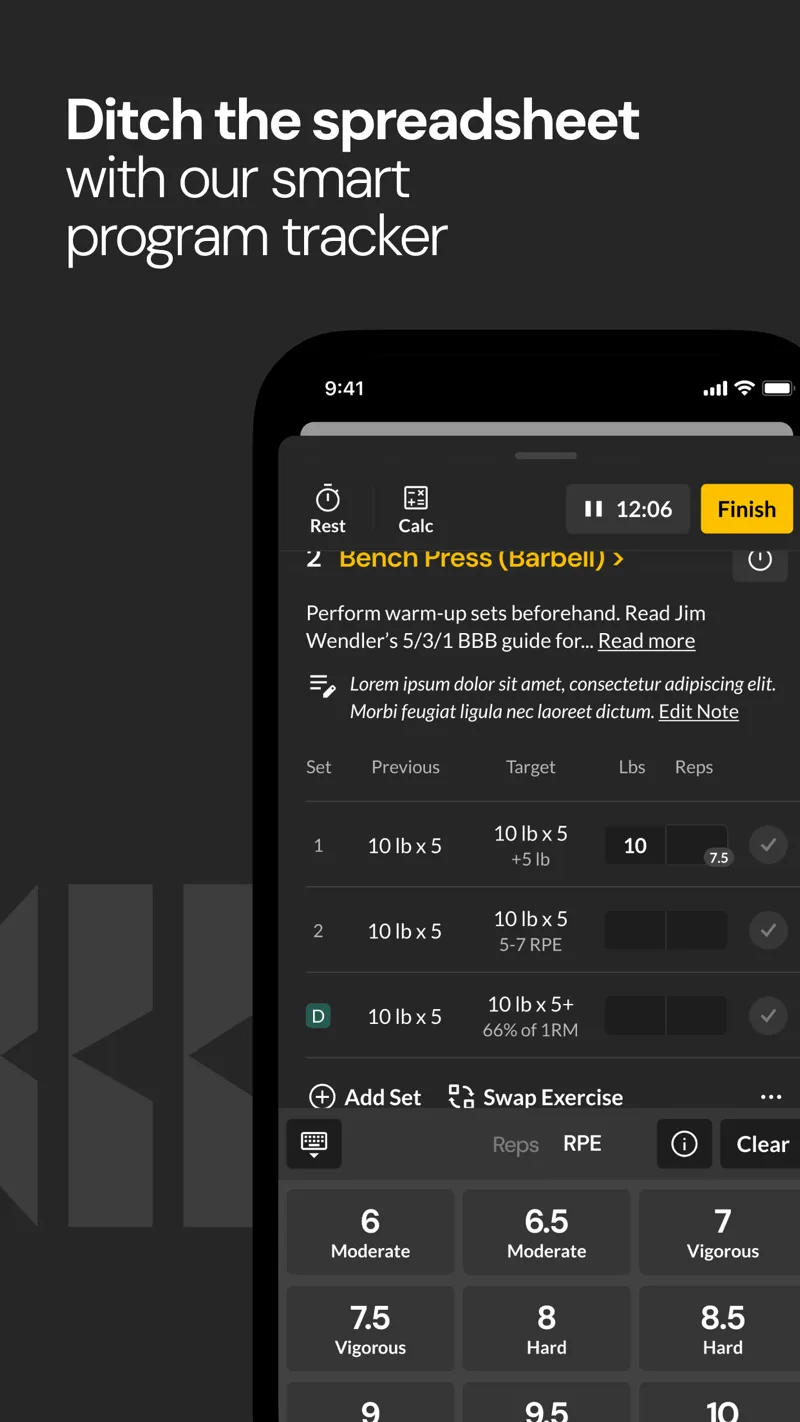
Publisher screenshot showing a program session and logging controls. It is not a workout completed for this review.
What is free, and what does Boostcamp Pro add?
The current Pro page separates a free program library and workout tracker from additional automation, analysis and exclusive content. Core training can be done without paying. Pro is most relevant when you want its extra tools to change a specific planning or review task.
| Job | Free starting point | Pro additions on the current page |
|---|---|---|
| Follow a plan | Broad library and workout logging | Exclusive coach programs |
| Record effort | RPE logging and session tools | Additional analysis |
| Build a program | Manual custom program builder | Questionnaire-based personalized programs |
| Progress working loads | Record actual sets and reps | Auto Progression |
| Review training distribution | Basic records and reports | Muscle Tracker and deeper chart views |
The website and App Store description currently differ in some program counts and the wording around Strength Score access. We therefore do not rank the app by a precise library total. Check the actual lock state of a feature you intend to buy, especially during a trial.
The official Pro page lists $14.99 USD monthly or $59.99 billed annually as of October 27. Its displayed annual trial is seven days; the monthly offer says no trial. Your store, country or promotion may show something different, so use the final purchase screen for renewal and cancellation terms.
How should you choose a program without getting lost in the library?
Start with constraints before selecting a famous coach. A five-day plan is not a better option if you reliably train three days. Check whether the exercises use equipment you have, how long sessions are likely to take and what the progression expects you to record.
Use this shortlist before importing a program:
- Days per week you can sustain, including busy weeks.
- Experience level and familiarity with the required movements.
- Available equipment and acceptable substitutions.
- How the plan changes load, repetitions or sets.
- What to do after a missed session or missed target.
Then commit to understanding one plan. If you change several movements, training days and progression rules immediately, you are evaluating your modified version. That may be appropriate, but it should be written down rather than attributed entirely to the original program.
What does the Muscle Tracker actually tell you?
Boostcamp describes its Pro Muscle Tracker as a view of per-muscle training volume. The feature overview and Pro page describe heatmaps and analysis derived from logged work. Those records can show where your program allocates attention; they do not directly measure muscle size or prove that a particular area grew.
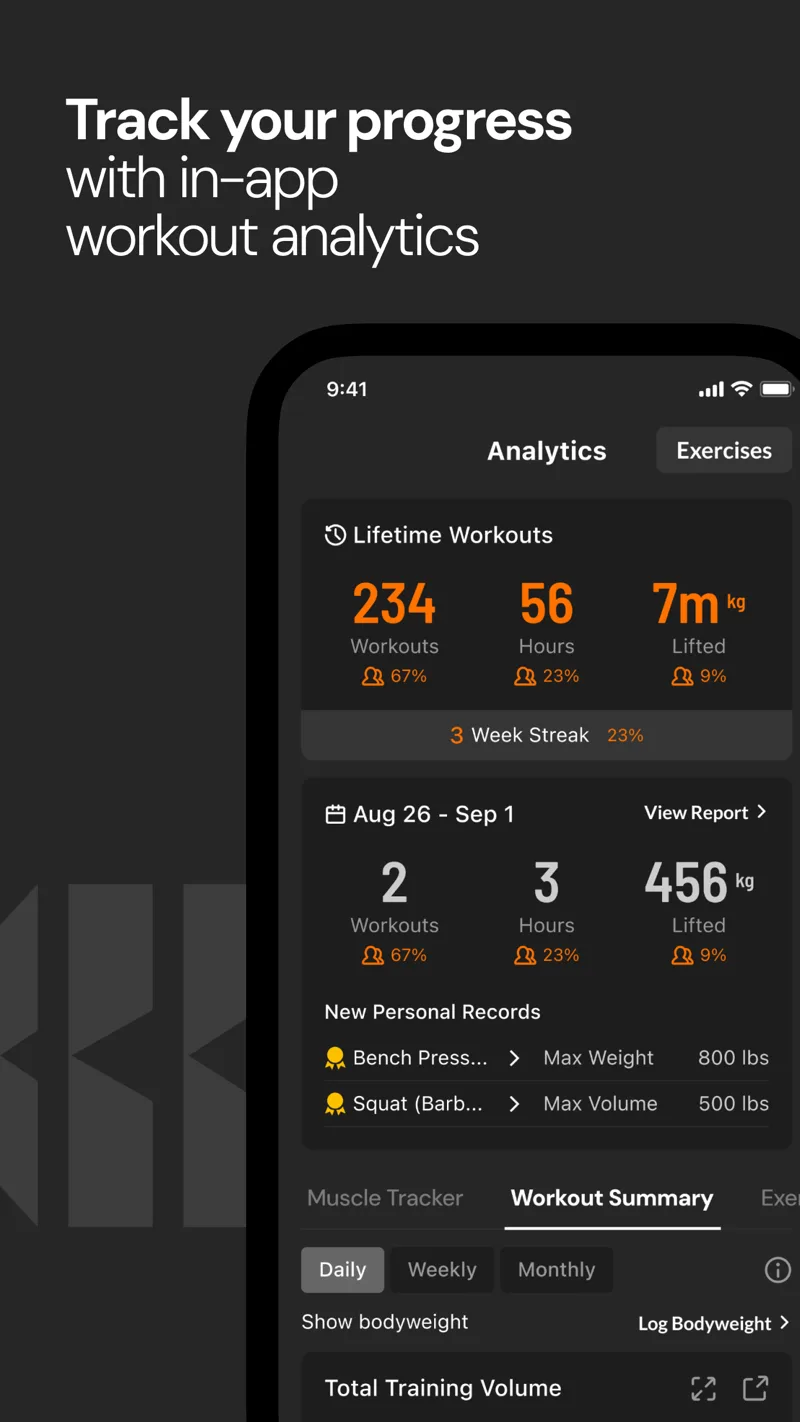
Publisher screenshot of training analytics. The values are interface examples, not our results from the app.
The practical question is whether the distribution matches your plan. If you intended to prioritize pulling but logged mostly pressing, the record exposes a mismatch you can investigate. It does not establish the ideal amount of training for every person, and the label attached to a muscle is not a diagnosis of a weak body part.
Compare performance within a movement under similar conditions. An estimated one-rep maximum is useful as an estimate; a different rep range, technique or effort changes the comparison. If you want another logging format, our Hevy versus Strong guide covers that choice.
Does Boostcamp support photos and private workouts?
Yes. The Community and sharing guide describes workout photo cards, sharing destinations and per-workout visibility. It lists Everyone, Followers and Only Me, with Everyone shown as the default. Review your default before adding a photo you only intend to keep for yourself.
A saved workout photo can be a useful memory or accountability record. A repeated-pose body check-in has a different purpose. You can do both, but keep a relaxed baseline photo separate from a celebratory post-workout image if you want to compare appearance across months.
How can you review a full training block?
Copy this sheet at the start of a program. It deliberately separates compliance, performance and appearance. No sample improvements have been invented to demonstrate the app.
| Checkpoint | Training record | Body-progress record | Decision |
|---|---|---|---|
| Before the block | Chosen plan, anchor lifts, schedule | Dated photos and usual measurements | Establish the baseline |
| Each week | Sessions completed and changes made | Repeat conditions; note missing records | Fix execution or recording friction |
| Middle of block | Comparable anchor-lift performance | Compare similarly captured views | Check whether the plan still fits |
| End of block | Completed work and performance trend | Review the full dated series | Keep, adjust or replace with a stated reason |
A 12-week calendar is a planning example, not a promise that every body change will be obvious in 12 weeks. If you miss several sessions, the record helps you recognize an execution problem before deciding the program is ineffective. If the work was consistent but the outcomes are unclear, inspect the measurement quality and relevant training or nutrition context.
You can compare two dated pictures with the free progress-photo comparison tool. GainFrame is an optional iOS companion if you want a dedicated photo library and photo-based estimates alongside your lifting record. It does not replace Boostcamp's programming; selected pictures are sent for AI processing while the library remains on-device.
When should you choose a simpler log instead?
If a coach already gives you every session and your current log works, a large program library may add little. If you enjoy creating your own plans, judge Boostcamp's builder against your existing process rather than subscribing for features you will not use. If discovering a plan is the missing step, the free library is a sensible place to begin.
The broader workout tracker comparison can help you separate programming, logging and social needs. The right app is the one that makes your chosen plan easier to follow and review, not the one with the most impressive number of templates.
What else should you know before choosing?
Is Boostcamp free to use?
Boostcamp provides a free workout tracker and a substantial program library. Its current Pro page reserves additional automation, analysis and selected programs for paid access. Try the free workflow with the program you actually want to run. Confirm any specific paid feature in the app rather than assuming every advertised tool belongs to the free tier.
Is Boostcamp Pro worth it?
Pro is most relevant when its automation or analysis removes a task you currently do manually, such as adjusting progression or reviewing training distribution. A beginner following one suitable free program may not need it immediately. During a trial, identify the feature you would miss and check the renewal price before committing.
Does Boostcamp have progress photos?
Boostcamp supports workout photos and share cards through its Community features. Those can document sessions and milestones, with visibility controls for who sees the workout. A standardized body-photo series requires consistent pose, framing and lighting regardless of where it is stored. Do not confuse a shared workout image with an independent measurement of body composition.
Can I keep Boostcamp workouts private?
The official Community guide lists Everyone, Followers and Only Me visibility options. It describes Everyone as the default, so review that setting before your first shared workout. Only Me keeps the workout off the feed. If you choose to post a photo externally, review that destination separately because its privacy settings are independent.
Does Boostcamp measure how much muscle I gained?
Its workout analysis describes the training you logged, including volume, records and muscle-group allocation. That is different from directly measuring muscle tissue. Use consistent performance records alongside dated photos and any measurements you normally collect. A higher volume total or a colored muscle map alone cannot establish a precise amount of muscle gained.
What should you do next?
- Choose by constraints. Pick a program that matches your realistic days, equipment and experience.
- Set privacy and baseline records. Review sharing settings and save the starting performance and photo context.
- Complete a defined review period. Track changes to the plan and assess the whole block before switching programs.
Keep a visual record of the work
GainFrame organizes progress photos and offers AI estimates on iOS. Free download with limited check-ins. Optional Pro subscription; current price and limits are shown in the app.
Download GainFrame Free