
Quick answer: MacroFactor suits lifters who want paid nutrition tracking with adaptive targets tied to intake and weight trends. MyFitnessPal suits those who want a free food diary or prefer its existing ecosystem and paid logging tools. Both support progress photos. Choose by the logging and review workflow you will consistently complete.
You log the same breakfast for 14 days, but the calorie target still feels like a guess. Or you already have years of saved meals and do not want to rebuild your food diary for another app. That is the useful starting point for MacroFactor vs MyFitnessPal: what work do you need the tracker to take over?
This comparison is about MacroFactor Nutrition, not the separate MacroFactor Workouts app. It uses official product pages, support documents and US listings checked October 27, 2026. We publish a progress-photo app, and this is a sourced evaluation rather than a timed food-logging test or a diet-results trial.
Which is better for a bulk or cut: MacroFactor or MyFitnessPal?
Choose MacroFactor when the main reason to pay is an intake-and-weight feedback system that updates your targets. Choose MyFitnessPal when you want an ongoing free food diary, familiar saved meals or a particular feature in its paid plans. Both can support a bulk, cut or maintenance routine; neither makes incomplete logs accurate by adding an AI label.
MacroFactor's product page describes coached, collaborative and manual modes alongside weight trending and food logging. MyFitnessPal's plan comparison separates basic logging from paid tools and meal planning. Compare those concrete jobs rather than treating “premium” as one identical package.
| Decision | MacroFactor Nutrition | MyFitnessPal |
|---|---|---|
| Ongoing free tier | No; trial then paid | Yes |
| Primary paid reason | Adaptive target workflow and analytics | Logging tools, reports and customization |
| Food entry | Search, barcode, label and AI-assisted options | Search; faster options in paid plans |
| Macro goals | Coached, collaborative or manual | Percentage goals free; gram targets paid |
| Meal-planning package | Recipe and logging tools | Premium+ meal planning and grocery tools |
| Progress photos | Gallery and comparison tools | Photos attached to weigh-ins |
| Body measurements | Body-metric records | Measurement records |
| Best starting point | Want weekly target guidance | Want free logging or continuity with an existing diary |
What does MacroFactor do well?
MacroFactor's appeal is the connection between logged intake, weight trends and subsequent recommendations. It is useful when you want the app to help interpret the relationship across weeks rather than simply tally today's remaining calories. It still depends on the records you give it, and an expenditure estimate is not a laboratory measurement of metabolism.
Its current nutrition listing includes food search, barcode and label scanning, recipes and photo-assisted logging. Treat a food photo as an entry to check: hidden oils, serving amounts and recipe differences still matter. A convenient capture method does not remove the need to verify the meal.
Platform: iOS App Store and Android through the official download page. US rating checked October 27: 4.84/5 from 23,545 US ratings.
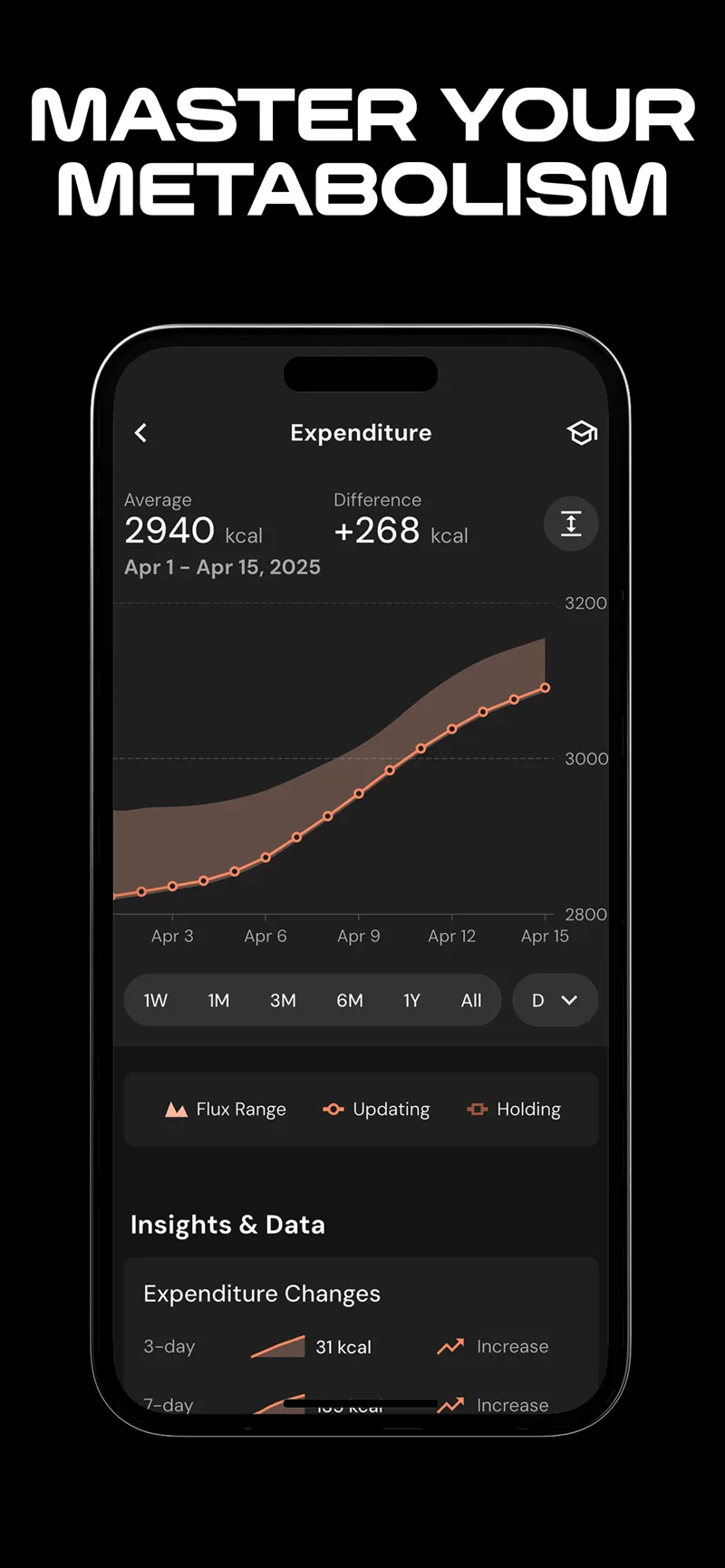
Publisher screenshot of MacroFactor’s expenditure view. This is a calculated estimate, not a direct metabolic test.
If you want the full product evaluation, read our MacroFactor review. The reason to consider switching is a workflow you will actually use, not a promise that changing apps guarantees a better cut.
What does MyFitnessPal do well?
MyFitnessPal offers a straightforward entry point: food logging is free. You can retain familiar meals, recipes and your existing record. That continuity can matter more than a theoretical advantage in another database if starting over makes you stop logging.
It is also no longer fair to describe MyFitnessPal as just a static calorie counter. Its current App Store listing advertises AI Coach and several logging methods. The Premium documentation includes meal scanning, voice logging, gram-based goals and controls over exercise calorie adjustments. Availability varies by platform, language and plan.
Platform: iOS App Store, Android and web via MyFitnessPal. US rating checked October 27: 4.71/5 from 2,384,277 US ratings.
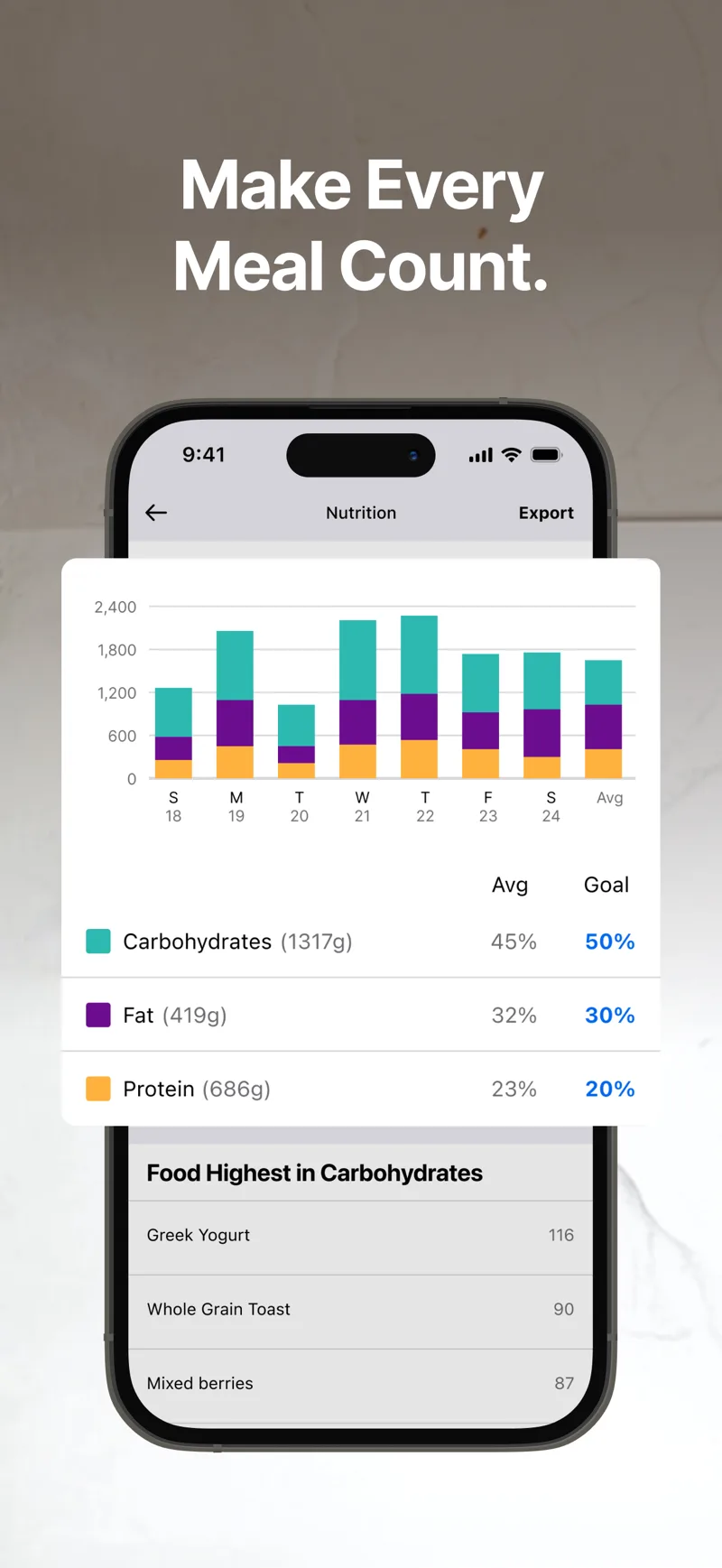
Publisher screenshot of MyFitnessPal’s nutrition summaries. The report depends on the food entries recorded in the diary.
Its strengths are especially relevant if your current diary already contains the foods you use and the people or services you share it with. Before moving, write down which feature is actually failing you: logging friction, targets, reports or meal planning. Those are different problems.
Do both apps already have progress photos?
Yes. MacroFactor's body-metric release notes document a Progress Photo tile, gallery and Before & After tool. It also supports tape-measurement records and comparisons. You do not need to buy a separate photo app merely because you use a nutrition tracker.
MyFitnessPal's Progress Photos FAQ describes adding pictures to current or past weigh-ins on iOS and Android. Images are cropped square, saved in the account and private unless shared. The crop matters if you want to keep your whole body visible in each comparison.
Neither the existence of a gallery nor a nutrition-coaching feature establishes a measured body-fat change from a picture. Use photos as a visual record, and keep their setup comparable. A relaxed morning photo and a post-workout flexed photo answer different questions.
How do the free and paid plans compare?
MacroFactor lists $11.99 monthly, $47.99 for six months or $71.99 yearly on its nutrition page, checked October 27. It offers a trial and no permanent free tier. These are dated US-facing prices, not a guarantee of the offer in your own store.
MyFitnessPal has Free, Premium and Premium+. Its official support directs readers to checkout for region- and term-specific prices. Premium adds logging and reporting options; Premium+ adds meal-planning and grocery tools. Do not compare the cost of one app's entire product with a different app's most expensive tier unless you need those extra services.
For a practical cost comparison, list the exact jobs you want: food search, barcode entry, targets, reports and meal planning. Then price the least expensive plan that covers them. A free app that you use may be a better purchase decision than a paid app you abandon after setup.
How can you compare your own food-logging workflow?
Use this small audit before moving a long-standing diary. It is a reusable evaluation, not a claim that we timed both apps.
- Find three packaged foods you buy every week and compare the entries with their labels.
- Enter a normal home-cooked meal, including ingredient amounts and the portion you eat.
- Save a repeat meal and check how easily you can adjust one component tomorrow.
- Review which measurements or exercise sources can change the calorie target.
- Check export, photo storage and subscription cancellation before building a long history.
Do not use database size as a substitute for this check. Ten recognizable foods with appropriate servings are more valuable to your routine than a larger total that still leaves your normal meals awkward to enter.
How should a lifter review nutrition and visible progress together?
Choose a review date, then bring four records to it: intake completeness, a weight trend, training performance and comparable photos. Keep them separate long enough to see disagreement. One higher weigh-in does not invalidate a training block, and a favorable photo does not prove the calorie log is complete.
| Record | Write down | Avoid concluding |
|---|---|---|
| Intake | Complete days and any uncertain entries | A missing day means zero intake |
| Weight | Trend and consistent measurement conditions | One fluctuation is tissue gained or lost |
| Training | Performance of comparable lifts | Every stronger set proves new muscle |
| Photos | Same pose and dates across the block | A lighting change proves a composition change |
Both apps can provide a basic photo record. If your priority is a larger pose-organized library, GainFrame is an optional iOS companion rather than a required replacement. It keeps the photo library on-device and sends selected images for AI processing; its body-composition outputs are estimates. You can first try two existing pictures in the free progress-photo comparison tool.
For another nutrition comparison, our Cronometer versus MacroFactor guide addresses a different pairing. Choose the diary that makes complete records easiest, then give those records enough time to inform a decision.
Which sources support this comparison?
The linked official product, support and App Store pages establish advertised features and current plan boundaries. MacroFactor's own comparison article is a vendor perspective, not independent proof that it wins. Our recommendations and evaluation template are editorial judgments; no head-to-head speed, accuracy or body-composition outcome was measured for this article.
What else should you know before choosing?
Is MacroFactor better than MyFitnessPal for a cut?
MacroFactor is a reasonable choice if you want its adaptive target workflow and are willing to log food and weight consistently. MyFitnessPal can also support a cut, including through its free diary. The better choice depends on the records you will maintain and the guidance you need, not the app name alone.
Can I use MyFitnessPal without paying?
Yes. MyFitnessPal offers free food and exercise logging, measurement records and basic macro viewing. Faster logging methods and additional customization may require a paid plan. Check the current plan table for your country and platform, especially if barcode scanning or gram-based goals are the main reason you want the app.
Do MacroFactor and MyFitnessPal track progress photos?
Both do. MacroFactor documents a dedicated progress-photo area and comparison tools. MyFitnessPal lets you attach photos to weigh-ins and share them if you choose. Try those native features before adding another app. Keep the pose, framing and lighting consistent so a comparison reflects more than a change in camera setup.
Can a food photo tell either app exactly how many calories I ate?
A photo-assisted entry should be checked rather than treated as an exact measurement. Ingredients, cooking oil, portion size and preparation can be difficult to infer from an image. Review the recognized foods and amounts before saving. Convenience helps when it supports complete logging; it does not make every generated entry correct.
Should I switch if MyFitnessPal already works for me?
Not merely because another app is popular. Identify a specific benefit you want, such as a different target-setting workflow, before rebuilding a familiar diary. Test your usual foods and recipes during any available trial. If switching makes your records less complete, the theoretical improvement may be outweighed by the disruption.
What should you do next?
- Define the missing job. Decide whether you need logging, target guidance, reporting or meal planning.
- Test your normal foods. Check your recurring meals and serving sizes in the candidate app.
- Review a consistent record. Compare intake completeness, weight trends, training and similarly captured photos before changing your approach.
Keep a visual record of the work
GainFrame organizes progress photos and offers AI estimates on iOS. Free download with limited check-ins. Optional Pro subscription; current price and limits are shown in the app.
Download GainFrame Free