

Quick answer: The Winter Arc is a self-directed season of working on your goals, often from October through December. For fitness, start with a repeatable routine and consistent progress photos. Our free planner turns any start date into 90 days of check-ins, with a calendar, checklist, and three bigger comparisons.
You train through October, November, and most of December. Then you look for your first photo and find a mirror selfie from a different angle, under different light, with no clear date. You did the work. Comparing the result is harder than it needs to be.
A useful Winter Arc starts with a baseline you can return to. This guide gives you a simple photo routine and a free plan you can save today.
What is the Winter Arc challenge?
The Winter Arc is an online goal-setting trend centered on using the colder months to work on yourself. Some people focus on fitness; others include studying, reading, or daily routines. As the Associated Press explains, it has no single standard definition or rulebook.
For this version, the goal is straightforward: keep a useful record of your fitness progress over a defined period. Pick your focus, follow your training routine, and take photos you can compare later.
When does the Winter Arc start in 2026?
October 1 is a common starting point. It also gives you time to build a routine before January. You can start earlier, later, or on the day you are reading this.
The dates are worth getting right. October 1 through December 31 is 92 days, counting both dates. A 90-day plan beginning October 1, 2026 ends on December 29, 2026.
The free Winter Arc planner uses your starting date as day 1. It schedules the final photo 89 days later. If you want to keep going through New Year's Eve, you can take an extra photo then.
What Winter Arc rules are worth keeping?
Choose rules that make your routine easier to repeat. This photo-tracking version uses four:
- One clear focus. Choose consistency, muscle gain, fat loss, or recomposition. The planner labels your schedule with that focus.
- A repeatable photo setup. Use a spot, camera position, and poses you can reproduce.
- A weekly check-in. Capture the photo and carry on with your day.
- A few bigger comparisons. Look back at days 29, 57, and 90 instead of judging every new photo against yesterday.
These are the rules for our planner, not a universal fitness prescription. It does not set calorie targets, prescribe workouts, or require daily training. Keep the training and recovery routine appropriate for you.
If you are choosing between a seasonal plan and a fixed challenge, compare 75 Hard vs 75 Soft. Their exercise, recovery and photo requirements differ, so check the full schedule before committing.
How do you build a 90-day Winter Arc plan?
- Choose your start and focus. Pick a start date and one focus: consistency, muscle gain, fat loss, or recomposition. Build your schedule with the free Winter Arc planner.
- Take a repeatable baseline. Take front, side, and back photos under light and camera conditions you can repeat. Keep the original date.
- Save your weekly dates. Download the calendar or checklist. Take weekly follow-up photos and a final photo on day 90.
- Compare the bigger gaps. Compare days 29, 57, and 90 with your baseline. Keep conditions similar and note both changes and uncertainty.
The planner gives you a baseline, 12 weekly follow-ups, and a final day-90 photo: 14 photo check-ins in total. Your usual check-ins stay on the weekday you chose to start. The final photo falls five days after your last weekly check-in.
| When | What to do | For an October 1 start |
|---|---|---|
| Day 1 | Take your baseline photos. | October 1 |
| Every 7 days | Repeat the same photo setup. | Thursdays through December 24 |
| Day 29 | Make your first baseline comparison. | October 29 |
| Day 57 | Review the direction over a bigger gap. | November 26 |
| Day 90 | Compare your full arc. | December 29 |
Download the .ics calendar file and open or import it in your calendar app. The file contains separate all-day events; your calendar settings control notifications. If you prefer paper or Notes, save the text checklist or use the print option.
How do you take Winter Arc progress photos you can compare?

Before the first photo, choose a setup you can repeat on an ordinary week.
- Use the same room and light source.
- Keep the camera at the same height, distance, and angle.
- Use the same front, side, and back poses.
- Wear similar clothing that leaves the areas you want to track visible.
- Take photos at a similar time of day, before a workout.
- Keep each photo's actual date.
Our progress-photo setup tool can help you prepare. The pose guide gives you a reference for your first set.
Weekly capture is a practical way to remember the habit. It does not mean you should expect a visible difference every week. Use the longer comparison gaps to review the record, and keep relevant notes about changes in lighting, pose, or routine.
How can you compare your Winter Arc for free?
Use the private progress-photo comparison tool to put a baseline and a later photo side by side. Adjust their alignment before judging the difference. A higher camera angle or a changed pose can make the comparison harder to read.
Keep the original photos as well as your exported comparison. If the evidence is unclear, say so in your notes and keep collecting comparable check-ins. A 90-day deadline does not guarantee a particular physique result.
How do you keep your full Winter Arc together?
The free planner gives you the dates. Track your full Winter Arc in GainFrame to keep the actual check-in photos together and compare your progress throughout the season.
Take your baseline in the app, add the later check-ins, and return to the same history when you want a before-and-after. You can also bring in progress photos you already have. GainFrame is available on iPhone and is free to start.
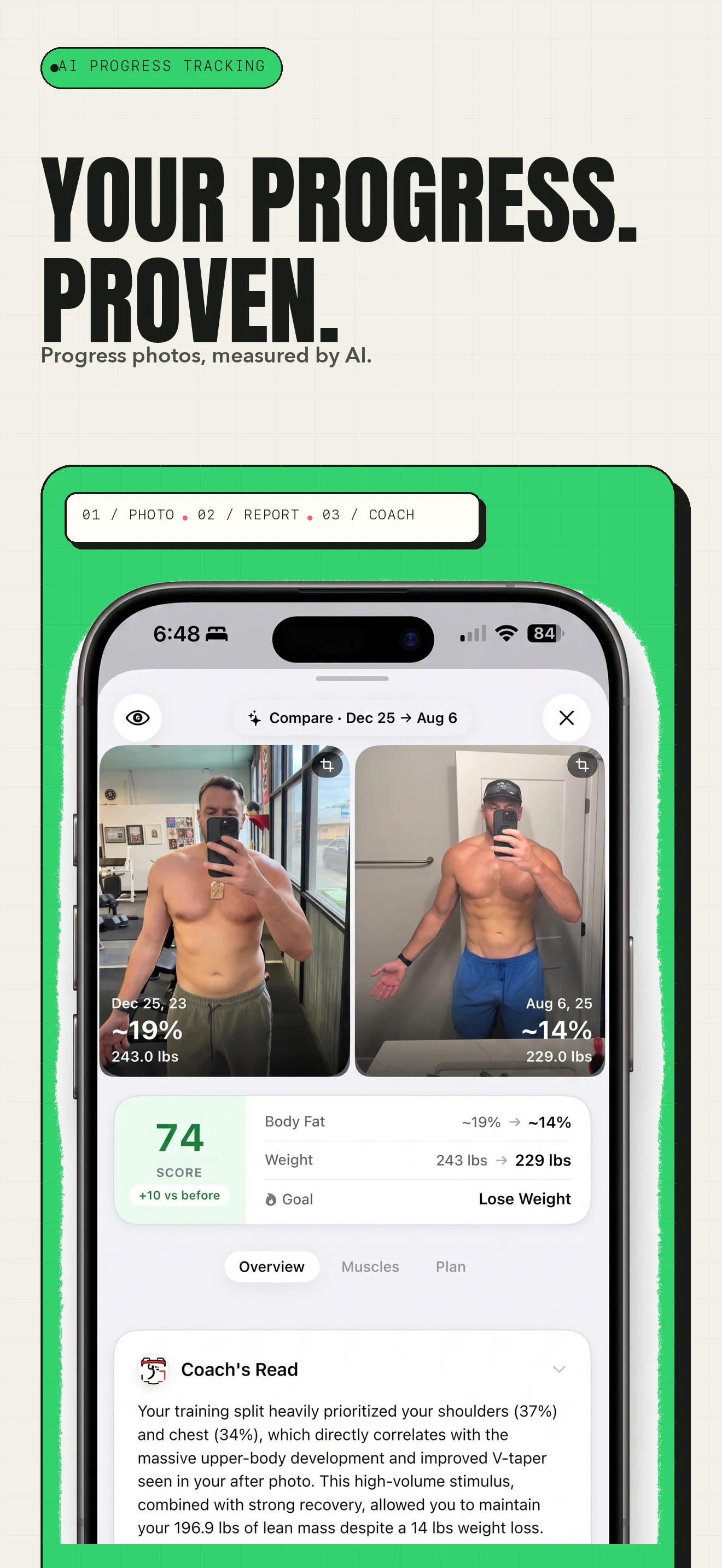
An example of GainFrame's comparison view. These photos span December 2023 to August 2025; they are not a 90-day Winter Arc result.
What else should you know before starting?
When does the Winter Arc start and end?
October 1 through December 31 is a common window, but there is no official start or finish. That calendar window contains 92 days. Our planner uses exactly 90 days, including your starting day: begin October 1, 2026 and finish December 29. Choose a different start date if that fits your life better.
What are the Winter Arc challenge rules?
There is no universal rulebook. For this photo-tracking version, choose one focus, follow your existing training routine, take consistent check-in photos, and review them over longer gaps. Weekly photos and comparisons on days 29, 57, and 90 are the schedule we use. They are planning choices, not requirements for everyone.
What happens if I miss a day or a photo?
Continue from where you are. Take a photo when you can, keep its actual date, and return to your schedule. A missed check-in does not erase your workouts or require a new day 1. An imperfect sequence with honest dates is still useful when you want to look back.
Do I need an app to do the Winter Arc?
No. The planner, calendar download, text checklist, and printable schedule are free to use without an account. You can keep your photos in a dedicated album and use the browser comparison tool. An app becomes useful when you want the full photo history and repeated comparisons together throughout the season.
Can I expect a visible transformation in 90 days?
There is no guaranteed visual result or amount of muscle gain or fat loss. Your starting point, training history, routine, and photo conditions all matter. Use the 90 days to collect a clearer record of what you did and what changed. Keeping the habit is useful even when the visual difference is subtle.
Start with your first photo. Pick the date, save your free plan, and use a setup you can repeat.
Track your full Winter Arc in GainFrame.
Keep every check-in photo together, compare your before-and-afters, and see how your physique changes across the full 90 days.
Track my Winter Arc