
Quick answer: ZOZOFIT is worth considering if you want phone-based circumference tracking and 3D comparisons. Its free plan now covers essential scanning, while Premium adds features such as AI food scanning. Start with the free workflow, confirm the current suit options, and evaluate consistency before paying for extras.
The first problem with researching ZOZOFIT is that reviews describe different products. One discusses buying a dotted suit. Another discusses a phone-only subscription. You can spend twenty minutes comparing experiences that no longer match the version you would download today.
Research basis: We reviewed current public product and support pages on September 6, 2026. We have not completed ZOZOFIT scans or measured its accuracy. This evaluation is written by Michael Rode, founder of GainFrame, a photo-tracking app in the same broader category.
What can you do with ZOZOFIT today?
The current website offers camera-based scanning, a 3D body model, measurements, and progress comparisons. It presents app-only scanning alongside an optional ZOZOSUIT, so buying the garment is no longer the starting requirement for everyone. The homepage also includes nutrition logging among the app's features. Current ZOZOFIT product overview
For a buyer, the useful distinction is between recording body shape and logging food. You may want both, but you should evaluate each workflow separately. A convenient food scanner does not establish that a waist estimate is accurate, and a useful body timeline does not make food logging effortless.
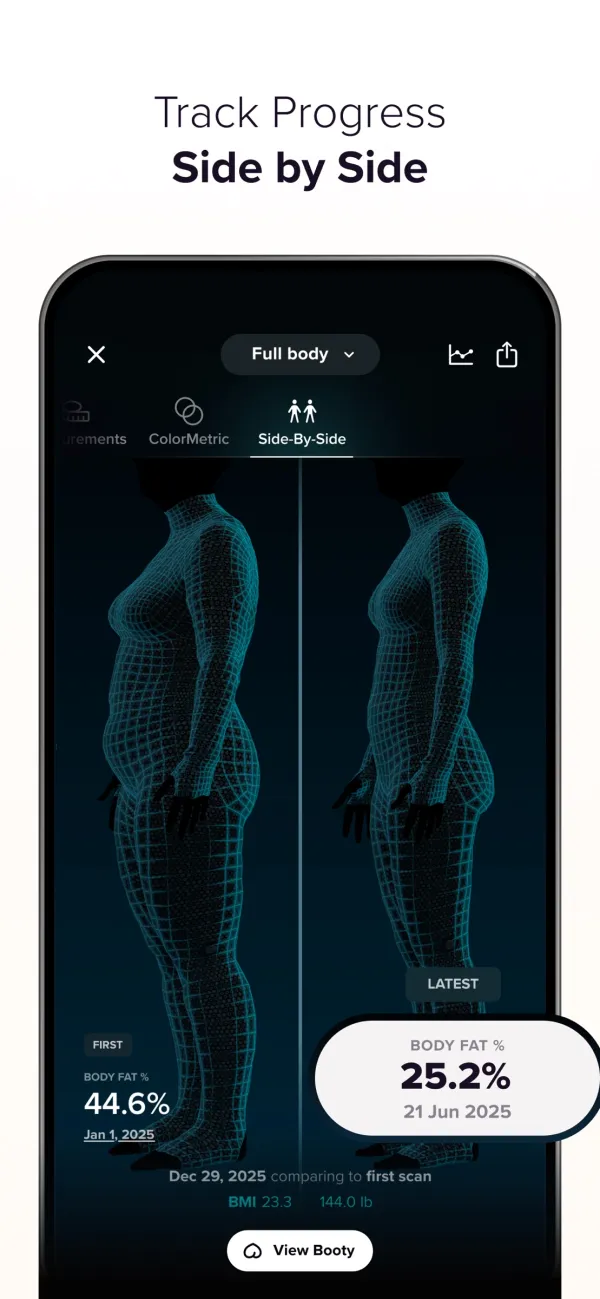
ZOZOFIT's App Store image illustrates its comparison view. The displayed measurements and transformation belong to the publisher's example; they are not results from our testing. Source: App Store, accessed September 6, 2026.
How much does ZOZOFIT cost now?
The company's support page lists a free plan for essential body scanning and tracking. It lists Premium at $4.99 monthly, $29.99 yearly, or $99.99 lifetime, in US dollars, with AI food scanning among the paid features. These are published prices checked September 6, 2026; confirm the offer shown before purchase. ZOZOFIT pricing support
| Decision | What to check first |
|---|---|
| Start free | Can you complete and compare the scans you need? |
| Buy monthly | Which paid feature will you use this month? |
| Buy annually | Have you already kept the habit long enough to justify a year? |
| Buy lifetime | Are you comfortable paying more upfront under the current terms? |
| Buy a suit | Is it useful for your specific scanning setup, and what does the offer include? |
A low annual price can still be wasted money if the setup makes you avoid scanning. Try the ordinary routine in the place you plan to use it before deciding how long to subscribe.
Do you need the ZOZOSUIT?
The current app-only option means you can investigate the basic workflow without treating old suit reviews as the whole product. Suit-based experiences remain relevant to the suit option, especially when evaluating setup, garment fit, and what the purchase includes. They should be labeled accordingly.
When reading a review, look for four details: publication date, app version, scanning mode, and clothing used. If any is missing, the result may be hard to apply to your situation. The current iOS listing is a useful second check on supported devices and current release notes.
How can you check whether your scans are consistent?
Use a small worksheet. This is a suggested evaluation method. We have not performed these tests.
| Record | Scan A | Scan B | Later check-in |
|---|---|---|---|
| Date and app version | Fill in | Fill in | Fill in |
| App-only or suit mode | Fill in | Same mode | Same mode |
| Clothing and setup | Fill in | Same setup | Same setup |
| Waist estimate | Fill in | Fill in | Fill in |
| Tape landmark and reading | Fill in | Repeat technique | Same landmark |
| Any setup warning | Fill in | Fill in | Fill in |
Follow the app's instructions. If a second scan is available, keep both results and note the difference. A close repeat suggests consistency under those conditions. Agreement with a tape is a separate comparison, and it only makes sense when the measurement landmarks match.
A modeled waist also does not tell you how much of a change came from fat, muscle, posture, or measurement variation. Our waist-to-height guide covers manual measurement context; this page evaluates the ZOZOFIT purchase.
Who is ZOZOFIT a reasonable fit for?
It is a plausible fit when you want a shape history, can repeat the scan setup, and find circumference trends motivating. The free entry point gives you room to judge that habit before buying additional features.
It may be a poor fit when you mainly want ordinary photographs, dislike a guided scanning process, or expect an exact body-fat diagnosis. A rendered avatar and an unaltered photo preserve different information. You can keep both, but there is no need to purchase two workflows you will not maintain.
If your decision is specifically about replacing ZOZOFIT, the existing ZOZOFIT alternatives guide owns that comparison. For a simple visual baseline, the progress-photo comparison tool lets you inspect two photographs without pretending a body model is a personal test result.
Which sources support this review?
We used the official product overview, published pricing explanation, and iOS product listing. Recommendations about evaluating a habit and documenting scan conditions are our analysis. There is no measured error table, personal suit experience, or accuracy ranking in this review.
What else should you know?
Is ZOZOFIT free?
ZOZOFIT currently offers a free plan for essential body scans and tracking. Premium adds paid features, including AI food scanning. Start with the free version to learn whether the scanning process suits your routine, then check the current feature list before deciding whether an upgrade solves a real problem.
Does ZOZOFIT require a suit?
ZOZOFIT offers app-only scanning as well as a suit option. That means an older review focused on buying and wearing a ZOZOSUIT may not describe the experience you would choose today. Check the current scanning instructions and identify which mode a review used before comparing its conclusions with your needs.
Can you trust ZOZOFIT body-fat readings?
Treat them as estimates. This review does not include original scans or a same-person comparison with a reference assessment, so it cannot establish an error range. Consistent repeat scans can help you understand the workflow, but repeatability alone cannot prove that the body-fat percentage is correct.
Is ZOZOFIT Premium worth buying?
It depends on the extra feature you need. If your purpose is a simple scan history, evaluate the free plan first. If a Premium feature saves meaningful effort, try the shortest suitable commitment before choosing an annual or lifetime purchase. Confirm the offer and its terms at checkout.
Can ZOZOFIT replace progress photos?
It can provide a shape and measurement history, while ordinary photographs preserve visible detail outside a rendered model. Choose the record that answers your question and that you can capture consistently. A scan and a photo can complement each other without either establishing exactly how much muscle you gained.
Keep a visual record of your progress
Use GainFrame on iPhone to organize progress photos and compare check-ins. Photo estimates have limits; a consistent visual history gives you another observation alongside your logs.
Get the app for iPhone