
Quick answer: Choose Gravl if you want to try its set-by-set progression workflow and standalone Apple Watch logging. Consider Fitbod if you value reusable workouts and a large exercise library. Both adapt workout suggestions to your inputs. Compare them using your own equipment, edits, and repeat sessions before committing to a subscription.
You have 45 minutes to train, one occupied cable station, and a phone suggesting an exercise you cannot do in that gym. The useful comparison between Gravl and Fitbod starts with how you handle that session. A long feature list only helps when the everyday workflow works for you.
Research basis: This is a comparison of published product information checked September 16, 2026. We have not completed a hands-on training trial with both apps. The screenshots below come from the publishers' US App Store listings. Michael Rode, the founder of GainFrame, wrote this guide.
If your gym sessions support a race or multisport schedule, also compare the AI fitness apps for athletes. That guide separates endurance-calendar planning from strength-session suggestions.
How should you choose between Gravl and Fitbod?
Put Gravl on your shortlist if you want to test its explicit set-by-set progression approach, planned week, or standalone Apple Watch workflow. Put Fitbod on the shortlist if saved workouts, an extensive exercise library, and adaptable session suggestions fit the way you train. These features give you concrete tasks to compare during a trial.
Both apps describe adapting recommendations around your circumstances and recorded training. Your decision should turn on the details you can inspect: which equipment is available, how easily you change a set, and whether you understand the next recommendation.
If you already follow a program you trust, start by deciding whether you need planning at all. Our Hevy vs Strong comparison covers the simpler logging decision. For the wider planning category, see the AI personal trainer guide.
What does Gravl offer?
Gravl's current product page describes planning a week around your equipment and schedule, then adjusting recommendations after you log training. It also advertises importing an existing routine from sources such as a document or social post. Those are useful features to test if you arrive with your own preferred split. Gravl product overview
The iOS listing explains progression in concrete terms: logged history informs an estimated one-rep max, repetitions advance, and the load steps up according to available plates or machine increments. It also describes using set feedback to adjust recommendations. That gives you a specific behavior to inspect in a trial; we have not tested the quality of those decisions. Gravl on the App Store
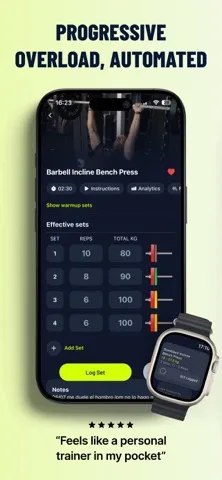
Gravl's publisher image illustrates its set log and watch interface. The progression and testimonial statements in the image are publisher claims. Source: US App Store, checked September 16, 2026.
Gravl's clearest strength on paper is the amount of control around a planned routine. During a trial, check that its settings match your actual plate increments and that an edited set leads to a recommendation you can interpret. Our separate Gravl app review provides a product-specific evaluation checklist.
What does Fitbod offer?
Fitbod describes building sessions around goals, experience, equipment, available time, workout history, and recovery estimates. Its product documentation explains these as inputs to an adaptive training system. That is useful context if you want to understand why a session changes after the work you logged. Fitbod's explanation of its training approach
The iOS listing includes saving and building workouts, learning from edits, and a library of more than 1,000 exercises with instruction videos. Those published features make Fitbod worth testing when you want to keep familiar sessions available while accepting selected recommendations. Fitbod on the App Store
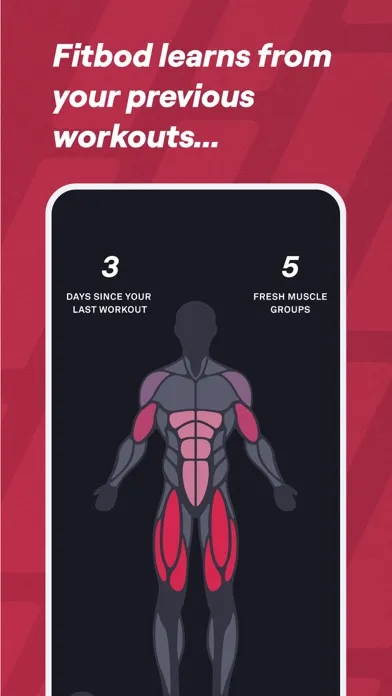
Fitbod's publisher image shows its recovery-related interface. The body diagram represents the app's model; it is not a direct measurement of tissue recovery. Source: US App Store, checked September 16, 2026.
Fitbod's established logging history is also a practical reason to stay if you already use it comfortably. Before switching, name the particular task Gravl would improve. A different interface alone may not justify rebuilding a routine or leaving useful history behind.
How do Gravl and Fitbod compare side by side?
This table summarizes published capabilities. It does not assign scores for recommendation quality or long-term results. Both publishers write favorable comparisons of their own products, so check the underlying feature rather than borrowing either vendor's winner label.
| Decision | Gravl | Fitbod |
|---|---|---|
| Workout planning | Describes a planned week that adapts after logged sessions | Describes sessions shaped by goals, history, equipment, time, and recovery estimates |
| Progression | iOS listing explains rep progression, load increments, and set feedback | iOS listing describes adaptive recommendations and learning from edits |
| Existing routines | Website advertises importing programs from documents or social posts | iOS listing includes saving and building your own workouts |
| Exercise instruction | Advertises trainer-led videos and offline downloads | Advertises more than 1,000 exercises with instruction videos |
| Apple Watch | Explicitly advertises standalone set logging and rest timers | Lists Apple Watch integration; test the workflow you need |
| Other connections listed on iOS | Apple Health, Garmin, Strava | Apple Health, Fitbit, Strava |
| Subscription structure | Limited basic access; monthly or annual paid plan | Trial access followed by monthly or annual subscription |
| US App Store snapshot | 4.9/5 from 5,272 ratings | 4.8/5 from 284,508 ratings |
Ratings were retrieved from Apple's US iTunes lookup API on September 16, 2026 and rounded to one decimal place. They are a store snapshot across different audiences and review volumes. A small star-rating difference cannot tell you which plan will work better for you.
What should you test before paying for either app?
Use an ordinary session from your current routine. You do not need to change your training program to evaluate logging and planning software.
| Trial task | What to record | Why it matters |
|---|---|---|
| Enter your gym and normal training time | Any equipment or timing corrections you make | A generated session needs to fit your circumstances |
| Replace an unavailable exercise | Whether the replacement and its history remain understandable | A crowded gym is a routine event |
| Correct a mistaken set | Whether the saved history now reflects what you performed | Future suggestions depend on the log |
| Repeat a familiar movement | Whether you can explain and edit its next target | Progression should be reviewable |
| Finish on your usual device | Any phone/watch handoffs or sync gaps you encounter | The workflow needs to survive an actual session |
Keep a short note after each test: time spent correcting the plan, any unclear target, and any missing record. These observations compare usability. A few sessions cannot establish a difference in muscle growth or injury risk.
If a suggested exercise or load conflicts with your ability or professional guidance, change it. Automated suggestions have limited context about your circumstances.
What do Gravl and Fitbod cost?
Fitbod's help center lists $15.99 USD monthly or $95.99 USD annually for individual subscriptions when checked on September 16, 2026. The annual charge works out to about $8 per month, paid as one yearly bill. Local prices, purchase routes, and promotions may differ. Fitbod subscription details
Gravl's terms describe monthly and annual subscriptions, with the available price supplied through the purchase flow. We could not verify one universal current US renewal price from those terms, so the price comparison remains specific to the offer you receive. Check the offer on your device and record the renewal total. Gravl subscription terms
Compare the total you would pay over the same period. Also check the trial deadline, which features your chosen plan includes, and where you would cancel. A free download does not establish unlimited ongoing access.
Who should try each app first?
Try Gravl first if its published rep-and-load progression workflow or standalone watch logging solves a specific problem for you. If importing an existing plan matters, test that feature with your own routine before assuming the result will need no editing.
Try Fitbod first if you want adaptable suggestions alongside reusable workouts and a large exercise library. If you already have a useful Fitbod history, compare the specific missing feature that motivates a switch before moving everything.
Keep a simpler logger if a coach or established program already decides your sessions. You can review our workout tracker guide for that separate choice.
How can you track results alongside your workout plan?
Record comparable performance on a few familiar exercises and keep dated photos under similar lighting and posing conditions. A workout log records training, while a visual record gives you another way to inspect change over time. Neither isolates exact muscle gain on its own.
For an optional photo-based starting point, try our free physique rater. Its visual assessment is an estimate and is not a Gravl or Fitbod integration. Keeping the same photo setup is more useful than comparing scores from unrelated images.
Your decision process can stay short. First, name the planning or logging problem you want to solve. Second, run the same ordinary tasks in each available trial. Third, choose the workflow you can maintain and review your training over time.
Which sources support this comparison?
- Gravl's product website and subscription terms.
- Gravl's US App Store listing.
- Fitbod's product website and published training-system explanation.
- Fitbod's US App Store listing and subscription help.
- Apple's Gravl lookup and Fitbod lookup for the dated ratings snapshot.
What else should you know about Gravl vs Fitbod?
Is Gravl better than Fitbod?
There is no independent training trial in this article establishing that one produces better results. Gravl emphasizes its progression workflow and training controls; Fitbod offers adaptive sessions, saved workouts, and a large exercise library. Choose the workflow that fits your gym and schedule, then test ordinary tasks before committing to a paid plan.
Can you use Gravl or Fitbod on Apple Watch?
Both advertise Apple Watch support. Gravl explicitly describes a standalone watch app for logging sets and repetitions, rest timers, and completing a session. Fitbod also lists Apple Watch integration. Check the exact workflow on your watch model, especially whether the features you want require the phone nearby or a particular subscription.
Is Gravl cheaper than Fitbod?
Fitbod’s help center lists individual plans at $15.99 monthly or $95.99 annually in US dollars when checked for this article. Gravl’s terms describe monthly and annual subscriptions but defer the current price to the purchase flow. Compare the actual renewal totals offered to you, including trial terms, rather than assuming a universal price difference.
Can beginners use Gravl and Fitbod?
Both describe personalized training that accounts for experience and available equipment. Exercise demonstrations can help you understand the suggested movement, but an app cannot observe every repetition or assess an injury. Start with settings that reflect your actual experience, review suggested loads, and get qualified help when you need technique or health guidance.
Should you switch if Fitbod already works for you?
A switch needs a specific benefit, such as a watch workflow, progression control, or setup task your current app handles poorly. Test that task in the alternative before moving your routine. Keep your existing history available and avoid changing programs just to compare apps. Familiar logging can be valuable when it helps you stay consistent.
Keep a visual record beside your training log
Use GainFrame on iPhone to organize progress photos and compare your check-ins. Keep the same setup and interpret photo-based estimates alongside your other observations.
Get the app for iPhoneFor a planning-versus-logging decision that includes Hevy Trainer, see Fitbod vs Hevy. Our MacroFactor Workouts review covers another structured training option.