
Quick answer: A Fit3D body scan gives you a surface model and body measurements derived from that shape. Your report can also include modeled body composition. Start with the scanner used, your scan date and the weight recorded for that visit. Then compare the same circumference and unit across visits before interpreting changes in a percentage.
Your waist entry falls by two centimeters, but the body-fat estimate barely changes. Those lines describe different things. One comes from a circumference around your scanned outline. The other comes from software interpreting the scan inputs. Read the two fields separately before trying to explain the difference.
What kind of Fit3D body scan did you get?
Ask the gym whether you used ProScanner or SNAP by Fit3D. ProScanner is the dedicated scanner with a rotating platform. SNAP uses a supported tablet. Fit3D says the systems share a reporting dashboard. For SNAP, weight must be entered, usually from a separate scale, and a balance report is unavailable. Fit3D's SNAP FAQ
Write the system beside the date even when the two reports look similar. If you move to a new gym or your facility switches systems, keep the old reports and mark the first result from the new setup.
Which report fields describe shape, and which are estimates?
Download the one-page Fit3D report field guide (PDF). It includes space for two dates and the same measurement from each report. The diagram below uses the documented SNAP workflow as an example. Your gym's screen layout may differ from this independent field guide.
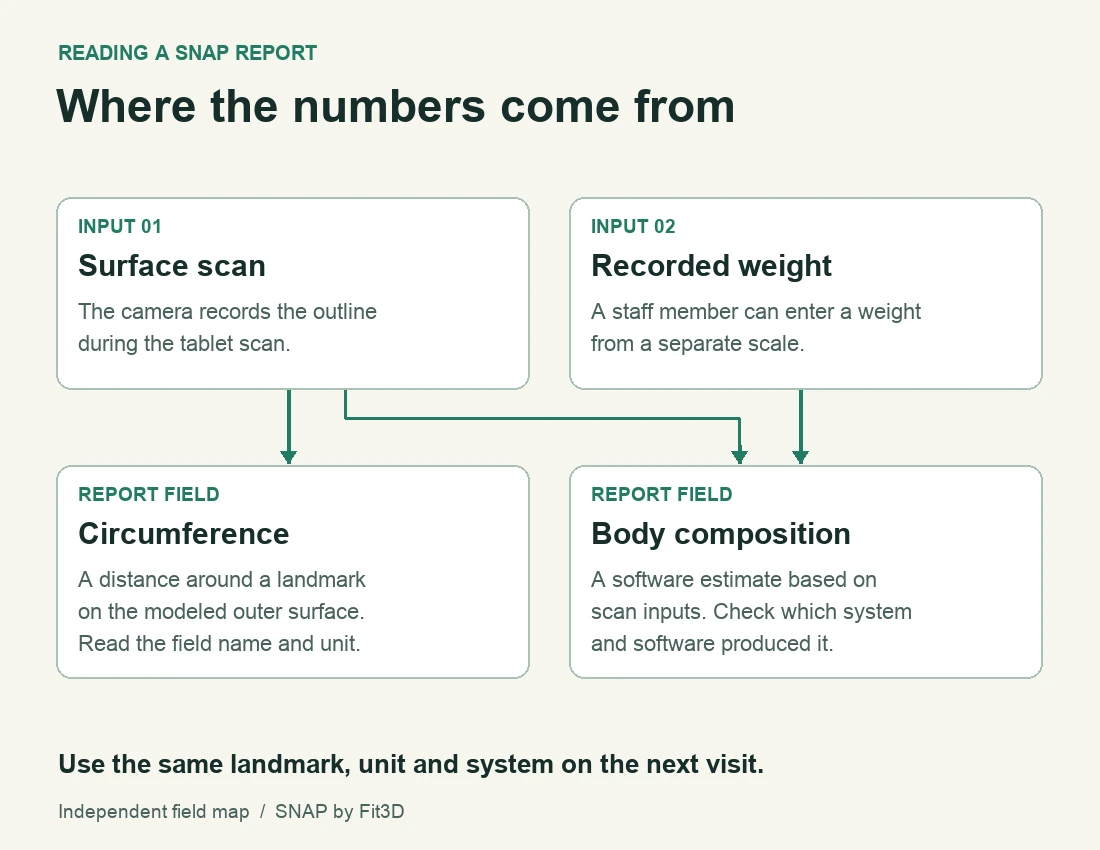
Reading a SNAP report starts with a surface scan and an entered weight. Look at where each field comes from before comparing visits.
| Field | Where it comes from | What to check |
|---|---|---|
| Avatar | A representation of the exterior surface from the scan | Look for a sleeve, loose fabric or a pose change that affects the outline. |
| Circumference | Software finds a landmark on the surface and measures around it | Compare the same named landmark and unit. A tape around a different spot is a different measurement. |
| SNAP weight | An input entered for the assessment | Confirm the weight and unit with the operator if a value looks surprising. |
| Body-fat percentage | Software predicts composition from scan inputs | Check whether the device or software changed between visits. An optical surface scan cannot directly see fat or muscle beneath the skin. |
Fit3D's ProScanner measurement guide illustrates its core landmarks and explains how motion, clothing and hair can affect measurements. Its SNAP software update notes describe changes to how scan inputs are interpreted for body composition.
How do you compare two Fit3D visits?
Use one row per measurement. For example, suppose your saved reports say 84 cm and 82 cm for the same waist field. You can record a two-centimeter difference in the reported circumference. Those numbers alone cannot tell you how much fat changed, whether the scanner found exactly the same landmark, or what caused the difference.
- Put the two dates, systems and units beside the values.
- Inspect the corresponding views for changes in clothing or stance.
- Check whether the facility changed software, equipment or your recorded weight.
- Save both full reports so you can compare the same field again after a later visit.
If an arm merges into the torso in one avatar, or the outline catches a loose top, show the operator that area. Ask whether a repeat scan would be appropriate before treating a jump in the chart as meaningful.
How accurate is a Fit3D body-fat estimate?
A 2020 study by Tinsley and colleagues compared four commercial optical scanners, including FIT3D, with a four-component reference model in 171 participants. The researchers found that repeated scans could be reasonably consistent while individual composition estimates still differed from the reference. Device-level averages cannot tell you the error on your report. Original scanner comparison
The equipment and algorithms evaluated in that study predate the October 2025 SNAP model update. If you want to know how a current estimate was validated, ask which device, software and participant sample the evidence covers. A body-fat percentage and a circumference also require different validation.
How can you keep a copy and track changes between visits?
In your scan portal, Fit3D documents a Printable item or a Download Report option near the top of the scan profile. Pick the correct date before exporting. A PDF is useful if you change providers later. Store it somewhere you are comfortable keeping personal body measurements. Fit3D's PDF instructions
For shorter check-ins, our guide to body scanning and measurement apps explains what different phone tools record. You can also compare two dated progress photos using the same angle and distance. Keep those photo observations alongside their own dates and leave the scanner values attached to the visits that produced them.
What else should you know?
Does a Fit3D scan measure weight?
The answer depends on the system your gym used. For SNAP, Fit3D says a weight entry is required and recommends having a scale nearby. Ask the operator which weight was entered and which unit it used. Keep that value with the visit date when comparing reports.
Why is my Fit3D waist different from my jeans size?
A scanner reports a circumference at its defined landmark. A garment label uses a sizing system, and the waistband can sit at another height. Look at the scan landmark and unit first. If you use a tape at home, record where you place it so those readings form a consistent series.
Does the Fit3D avatar show how much muscle I gained?
The avatar represents the body surface during the scan. Muscle tissue is beneath that surface. You may see a difference in outline or a reported circumference that you want to follow up, but a picture of the avatar alone cannot establish which tissue changed or by how much.
Can I compare a ProScanner report with a SNAP report?
Keep both reports and label the change of system. Check the landmark names, units, inputs and software dates with the operator before comparing them. Establishing a fresh baseline on the new setup makes later within-system changes easier to interpret, especially when a single difference is small.
Why does my SNAP report have no balance section?
Fit3D's support guide says SNAP shares a reporting dashboard with ProScanner and does not supply a balance report. A blank or missing balance section on SNAP is therefore expected. If a different field is missing, ask the facility what the specific system captured for that visit.
Bring one measurement forward
Pick one landmark, add its units and save the two dates in the field guide.
Get the report field guide